How to Use Advanced Functions
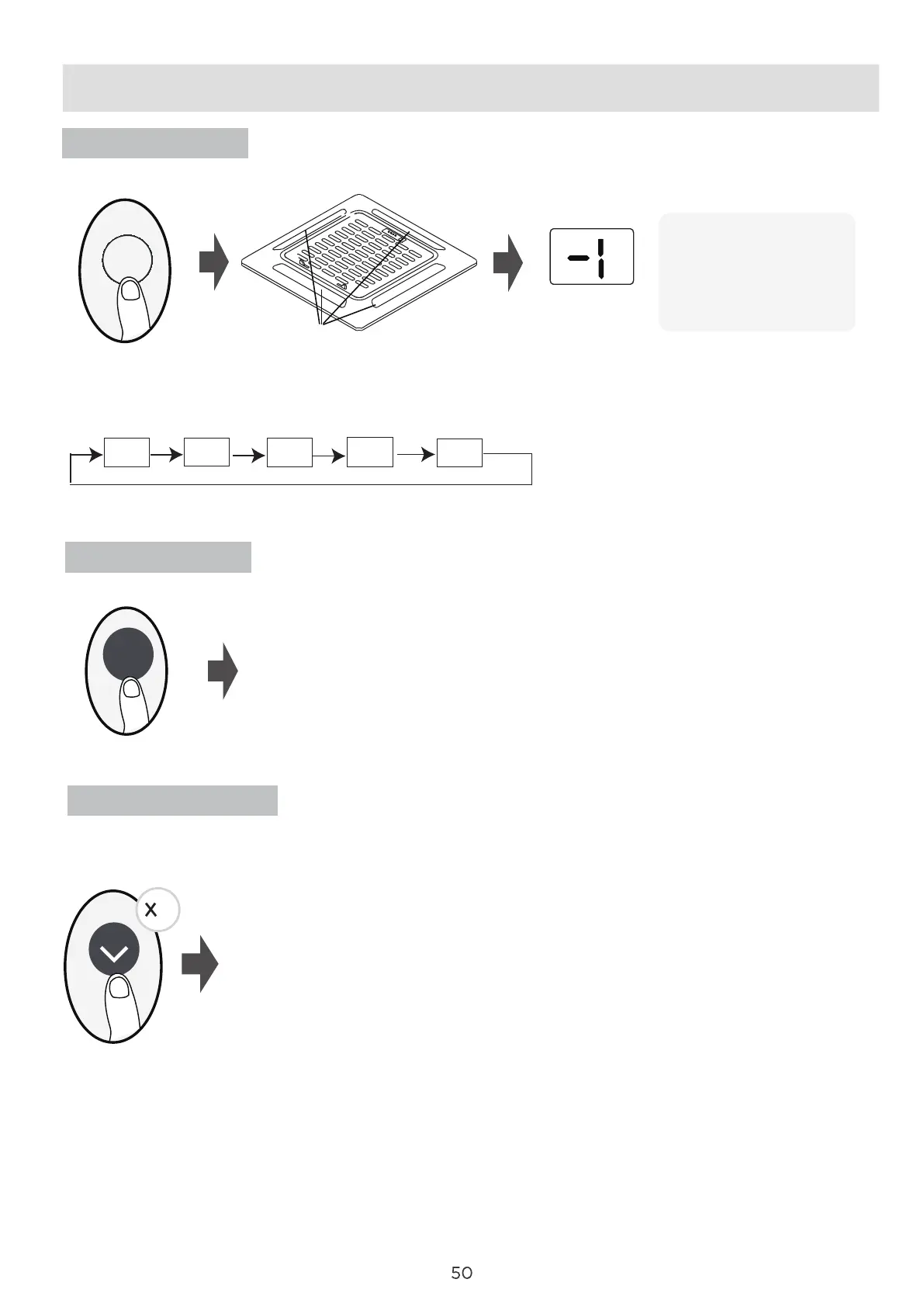
Swing function
Vane function
FP function
Press Swing button
The horizontal louver auto swing feature is energized.
Press again to make it stop.
Swing
Press this button 2 times during one second under HEAT Mode and setting temperature of
16°C/60°F.
The unit will operate at high fan speed (while
compressor on) with temperature automatically
set to 8°C/46°F.
Press this button 2 times during one second under HEAT Mode and setting temperature of
16°C/60°F to activate the FP function. Press On/O, Sleep, Mode, Fan and Temp. button
while operating will cancel this function.
Note: This function is for heat pump air conditioner only.
2
Press Vane button when the unit is turned on.
Press this button to activate the louver setting feature.Each time you press the Vane button button,
the display panel will display the selected louver in an order as(“-0” indicates that four louvers are all
selected):
Press Swing button to start/stop the auto swing feature of the selected louvers.
The system will exit the
louver setting mode If
there is no operations
during a 10 seconds
period.
-1
-2
-3
-4
-0
Vane
4 Louvers




 To Next Page