EasyManua.ls Logo

Midland 74-200 - User Manual

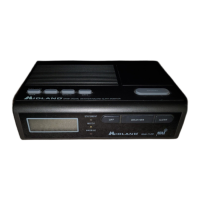
Midland 74-200
30 pages
Print Icon
To Next Page IconTo Next Page
Loading...
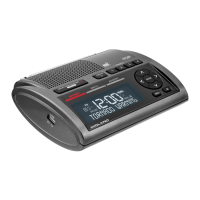
Model 74-200
Digital Weather Receiver with
NWR-SAME decoding and
Digital clock with alarm

Questions and Answers

  • D
    Dr. Michael DavidJul 26, 2025
    What to do if Midland 74-200 Weather Radio is not responding to NWS weather alert broadcasts?
    • S
      Samantha TorresJul 26, 2025
      To ensure your Midland Weather Radio responds correctly to weather alert broadcasts, verify that you've programmed the correct FIPS codes into the radio's memory and that '999999' is not programmed with any other FIPS codes. Also, if you want to hear the alert or operate a device from the EXT.ALERT jack, make sure the display shows 'WEATHER ALERT ON' by pressing the ALERT button.
  • L
    leah37Jul 31, 2025
    How to fix Midland Weather Radio with no power?
    • A
      Angela GrayJul 31, 2025
      If your Midland Weather Radio has no power, ensure the wall power adapter is correctly connected to AC power. Also, check that the cord is securely seated in the radio and a fresh back-up battery is installed in case AC power fails.
  • C
    chapmanheatherAug 6, 2025
    How to turn on the sound on a Midland 74-200?
    • S
      Shelby BeckerAug 6, 2025
      If there is no sound coming from your Midland Weather Radio, check the VOLUME setting.
  • M
    Michael DelgadoAug 13, 2025
    What to do if no weather broadcast when I press WEATHER on my Midland 74-200?
    • C
      Chad WeissAug 13, 2025
      If you're not getting a weather broadcast when you press WEATHER on your Midland Weather Radio, ensure that the telescoping antenna is fully extended.
  • J
    Jennifer DeanSep 10, 2025
    Why is my Midland 74-200 alerting for the wrong areas?
    • T
      Todd SteinSep 12, 2025
      To fix a Midland Weather Radio that's alerting for areas outside the stored FIPS codes, make sure the all signals code (999999) isn't stored in the memory.

Summary

CONTROLS

Weather Bar Button

This is a push 'on' button. One push activates the weather receiver. Push again to return receiver to standby.

Alert Bar Button

This is a push on switch. It enables and disables the alert siren and external alert signals.

NWR-SAME:

EMERGENCY POWER

INITIAL SETUP

Connecting power

The AC power adapter is required for normal operation. Plug the wall adapter into a 110-115 Volt AC outlet. Connect the cord to the DC-12Volt power jack.

Antenna

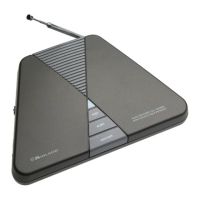
The telescoping antenna should be positioned vertically and extended to its full length for good reception.

What is a FIPS Code:

Acquiring FIPS codes for Your Area:

Setting the Clock, Alarm and Calendar

CLOCK

Press and release 'Display Mode' then 'Set' button. Use 'Hour/Date' and 'Min/Month' buttons to set time. Press 'Set' to store.

DATE

Press 'DISP. MODE' to 'Date', then 'Set'. Use 'Hour/Date' for day, 'Min/Month' for month, 'DISP. MODE/Year' for year.

Adjusting the Weather Frequency

Changing the Alert Pattern

FIPS Code programming:

Reviewing stored “FIPS” codes

ALL County Code

USING THE ALERT FUNCTION:

Setting the Alert Volume

Use the alert tone volume control on the bottom of the radio to adjust volume. Recommend maximum volume initially.

Connecting the External Alert Output to an External Device

The EXT. ALERT jack provides a switch closure to signal other devices when an alert is received.

NWR Alert Descriptions

Reviewing Overlapping Alerts

When a Test or Demo Alert Occurs

Reset Button

Back Light of the Display

Button press Beeps

TROUBLESHOOTING

FIPS code response issues

No NWS broadcast response

NOTES AND MAINTENANCE

Reception and External Antennas

Discusses typical reception range (25-50 miles) and use of external antennas for improved reception.

Troubleshooting Reception Issues

Contact local NWS to verify station is broadcasting and check channel/location.

Alert Test Signals

NWS stations transmit periodic test signals. Call local NOAA for test schedules.

Mobile Home Reception

Mobile home reception is difficult due to structure. Place unit near window or use an outside antenna.

12 VOLT OPERATION

FCC Compliance Information

SPECIFICATIONS

GENERAL

Details frequency range, number of WX channels, input voltage, and dimensions of the unit.

RECEIVER

Lists receiver specifications like sensitivity, selectivity, impedance, and power output.

EXT. ALERT OUTPUT

Provides specifications for sinking current and states for the external alert output.

SERVICE:

ONE YEAR LIMITED WARRANTY

Midland 74-200 Specifications

General IconGeneral
Power SourceBattery
SirenYes
DisplayLCD
Frequency Range162.400 - 162.550 MHz
Channels7
Battery Type3 AA batteries

Related product manuals