EasyManua.ls Logo

Midland Syn-Tech III P25 - User Manual

Midland Syn-Tech III P25
77 pages
Print Icon
To Next Page IconTo Next Page
Loading...
Service Manual
Revised 4.24.2009
Part Number 680-100-2020
Complete Service Information
for
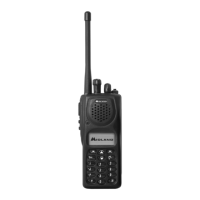
STP-105B VHF Portable
and
STP-404(A)(B) UHF Portable
SYN-TECH III
P2
5
P
O
RTABLE RADI
O

Table of Contents

Questions and Answers

  • S
    Samantha SanchezAug 12, 2025
    What to do if Midland Portable Radio displays ERROR 303?
    • M
      matthew52Aug 12, 2025
      If your Midland Portable Radio displays ERROR 303, this indicates a CRC error has been found in the DSP software. To resolve this, the firmware must be reloaded.
  • B
    brianharperAug 18, 2025
    What to do if Midland Portable Radio displays ERROR 202?
    • S
      shane91Aug 18, 2025
      If your Midland Portable Radio displays ERROR 202, it means an error has been found in the audio processor. To fix this, reload the firmware.
  • K
    Kristin Khan DDSAug 27, 2025
    What to do if Midland Syn-Tech III P25 Portable Radio displays ERROR 302?
    • A
      Alexander Gonzales IIAug 27, 2025
      If your Midland Portable Radio displays ERROR 302, it indicates that the microcontroller cannot connect with the DSP hardware. Check if the digital board is firmly fitted on the RF & Control Board to resolve this issue.
  • T
    Travis HebertSep 2, 2025
    What to do if Midland Syn-Tech III P25 displays ERROR 201?
    • H
      hollypetersSep 2, 2025
      If your Midland Portable Radio displays ERROR 201, it means an error has been found in the external RAM. The suggested solution is to change the RF & Control Board.

Midland Syn-Tech III P25 Specifications

General IconGeneral
P25 ComplianceYes
Frequency RangeVHF: 136-174 MHz, UHF: 403-470 MHz
Power Output5 Watts
CompatibilityP25
SignalingMDC1200
Dimensions1.5 inches

Related product manuals