Before using for the first time
22
This ventilation hood can be operated
with the Con@ctivity function via a
WiFi connection (Con@ctivity 3.0) or
via a wireless connection (Con@ctivity
2.0).
Con@ctivity via the home WiFi
network (Con@ctivity 3.0)
Prerequisite:
- Home WiFi network
- WiFi-enabled Miele cooktop
Connect the ventilation hood and
cooktop to your home WiFi network
(see “Setting up Miele@home”).
The Con@ctivity function will be
activated automatically.
Con@ctivity via a direct WiFi
connection (Con@ctivity 3.0)
Prerequisite:
- WiFi enabled Miele cooktop
If you do not have a home network, you
can establish a direct connection
between the cooktop and the
ventilation hood.
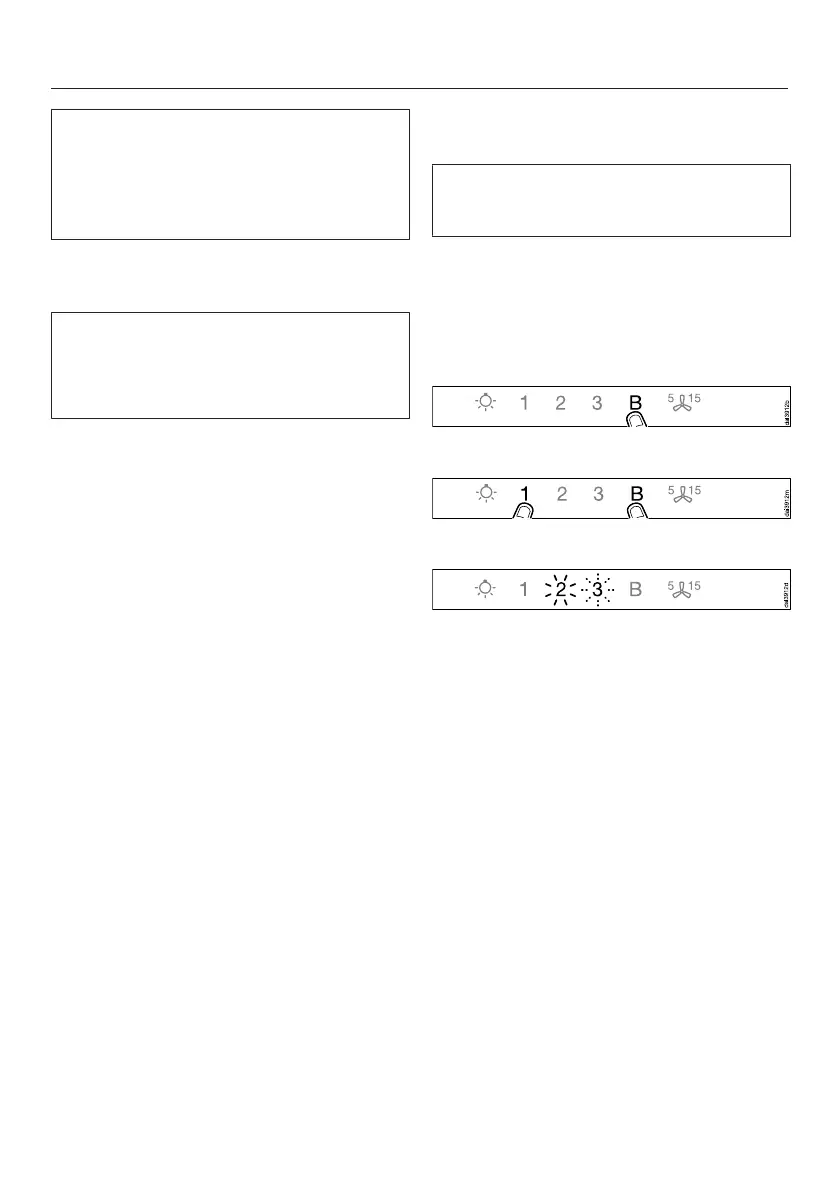
Switch the ventilation hood off.
Press and hold the B control.
Touch the 1 control at the same time.
2 will light up constantly, 3 will flash on
and off.
The ventilation hood is ready for
connection in the next two minutes.



 To Next Page