Cleaning and care
83
Removing the back panel
Danger of injury!
Do not use the oven without the
back panel in place.
The back panel can be removed for
cleaning purposes.
Danger of burning!
Make sure the oven heating
elements are switched off. The oven
must be cool.
Disconnect the appliance from the
power supply. Switch off at the wall
and withdraw the plug from the
socket, or switch off at the circuit
breaker.
Remove the side runners.
Undo the four screws in the corners
of the back panel and take it out.
Clean the back panel (see "Cleaning
and Care – Cleaning catalytic
enamelled panels").
Reassemble by following these
instructions in reverse order.
Refit the back panel carefully.
Make sure the openings are located as
illustrated in "Oven overview".
Refit the side runners.
Reconnect the appliance to the
power supply.
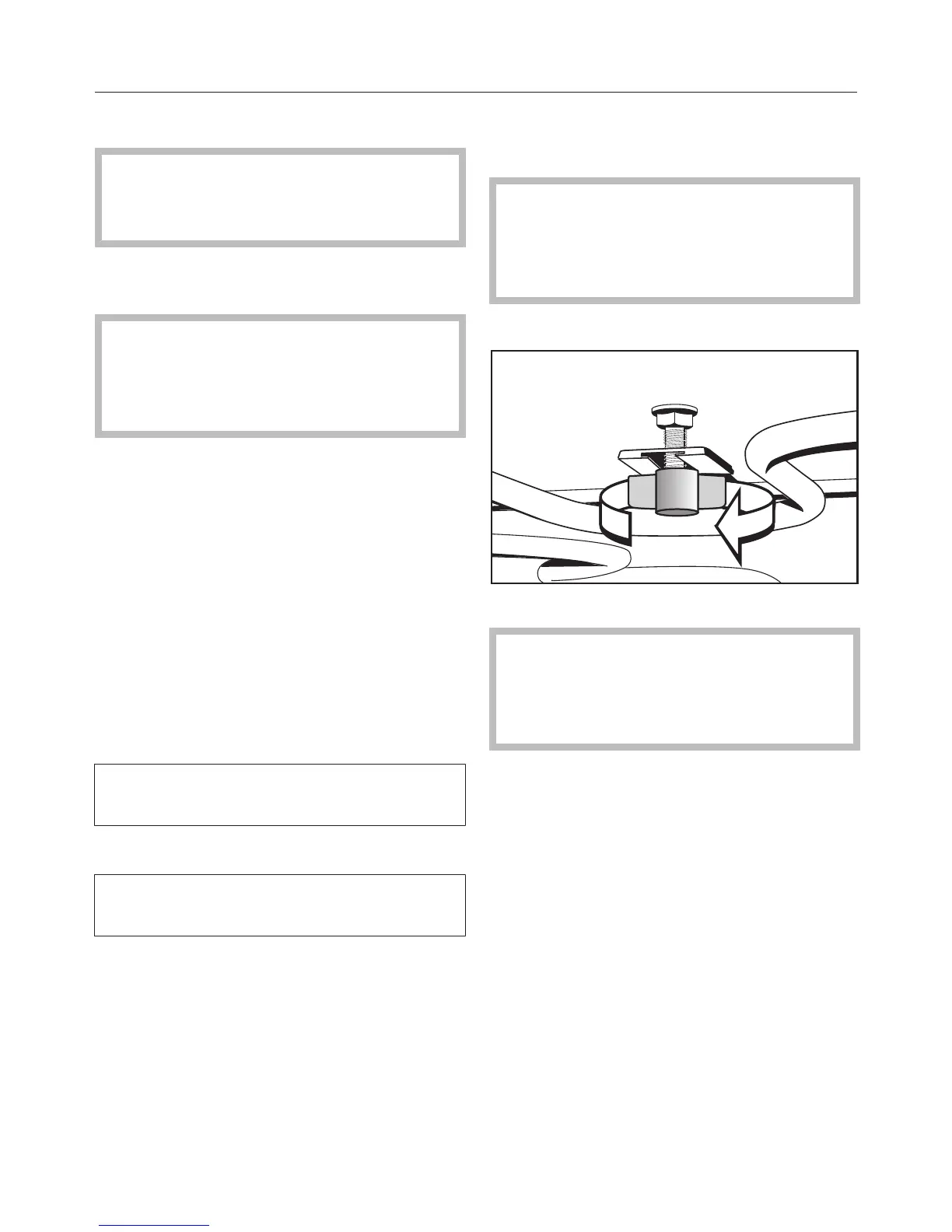
Lowering the browning/broiling
element
Danger of burning!
Make sure the oven heating
elements are switched off. The oven
must be cool.
Remove the side runners.
Unscrew the wing nut.
Take care not to damage the
browning/broiling element.
Do not use force when lowering the
browning/broiling element.
Carefully lower the browning/broiling
element.
The oven ceiling can now be cleaned.
Raise the browning/broiling element
and tighten the wing nut securely.
Refit the side runners.


 To Next Page