Info level 1
60
10 Info level 1
Calling info level 1
Press the following button:
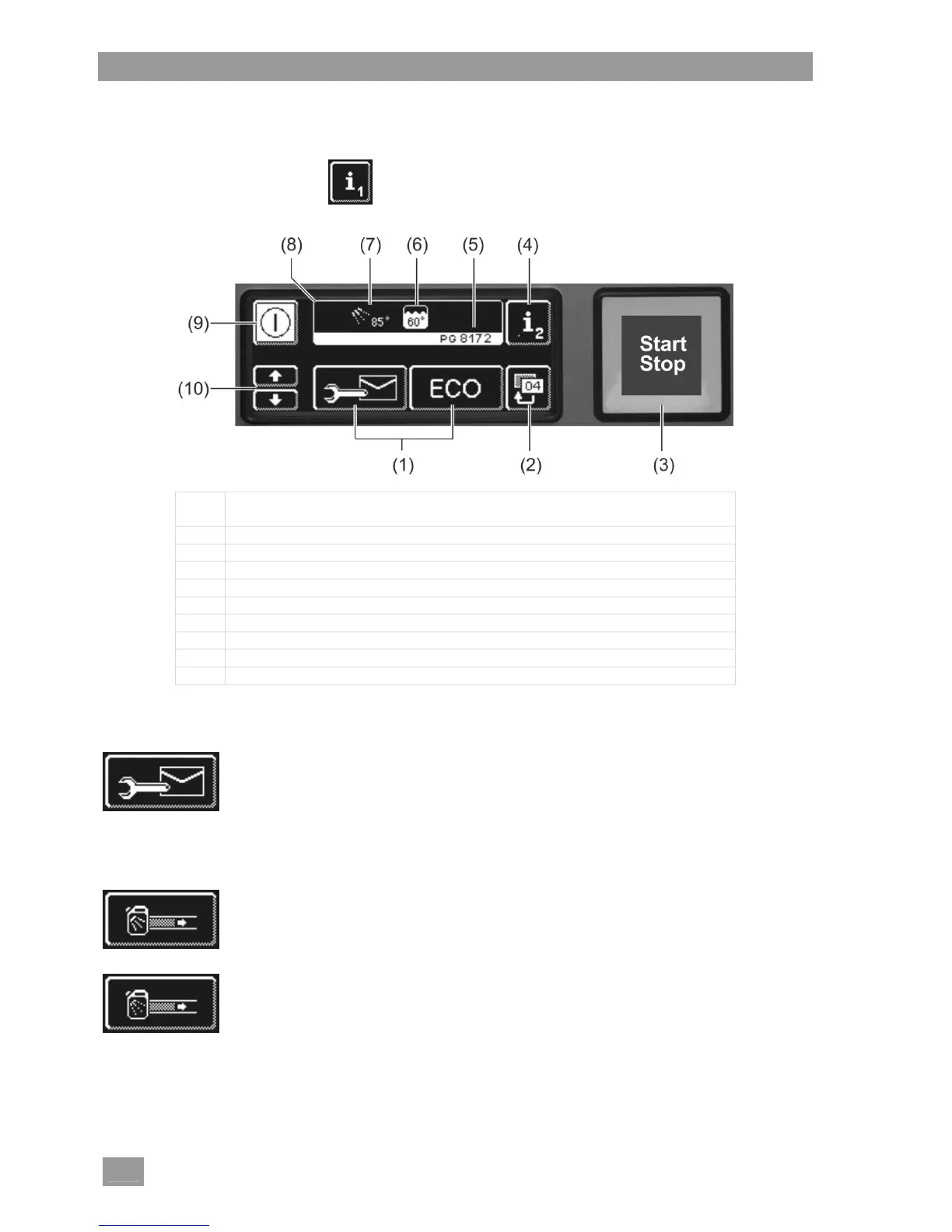
(1) Buttons for retrieving information, the priming of the dispenser pumps and
the selection of additional programmes
(2) Back button
(3) Start button
(4) Switch to info level 2 ( 11)
(5) Type designation
(6) Current tank temperature
(7) Current rinse temperature
(8) Info field
(9) On/Off button (tank will then not be emptied)
(10) Scroll buttons of area (1)
Buttons of area (1)
Addresses
Press the button.
The following 2 addresses appear:
SERVICE: Address of the service technician
CHEMICALS: Address of the chemicals supplier (rinse aid, detergent, ...)
INFO If no addresses appear, the authorised service technician can enter the
relevant addresses.
Prime the detergent dispenser pump and dosing tubes
Keep the button pressed.
The background of the button becomes white. The dispenser pump is activated
(max. 30 seconds)
Prime the rinse aid dispenser pump and dosing tubes
Keep the button pressed.
The background of the button becomes white. The dispenser pump is activated
(max. 30 seconds)


 To Next Page