Technical Information
59
2xx, S 3xx & S 4xx Canister Vacuums
6.5 Poor Blower Performance (S 27x and S 28x)
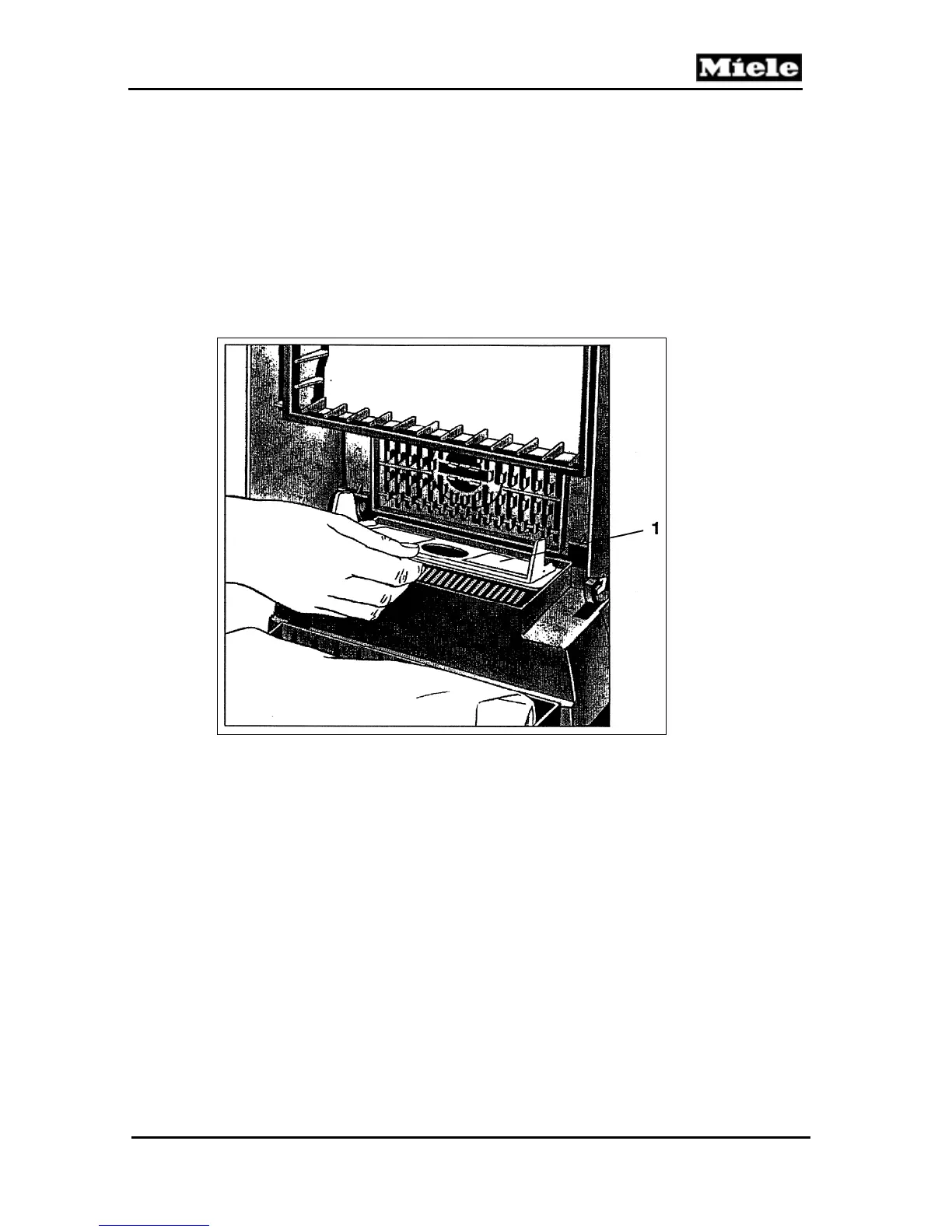
The blower feature can be improved by installing the blower plate (Figure 6-6,
Item 1), part no. 3061172.
1. Open the dust compartment lid, remove the Air Clean filter and install the
blower plate with its arrow pointing to the rear panel.
2. Before closing the dustbag compartment open the accessory compartment
lid.
3. Close the dustbag compartment and install the suction hose onto the
blower outlet in the accessory compartment.
4. After blowing has been completed, re-install the Air Clean filter.
Figure 6-6: Blower Plate for S 27x and S 28x
6.6 Dustbag Change Indicator (S 3xx)
The point at which the indicator shows that the dustbag should be changed
can be modified by turning the adjustment screw (Figure 6-7, Item 1) as
follows:
Counterclockwise: Indication to change the dustbag occurs earlier
Clockwise: Indication to change the dustbag occurs later



 To Next Page