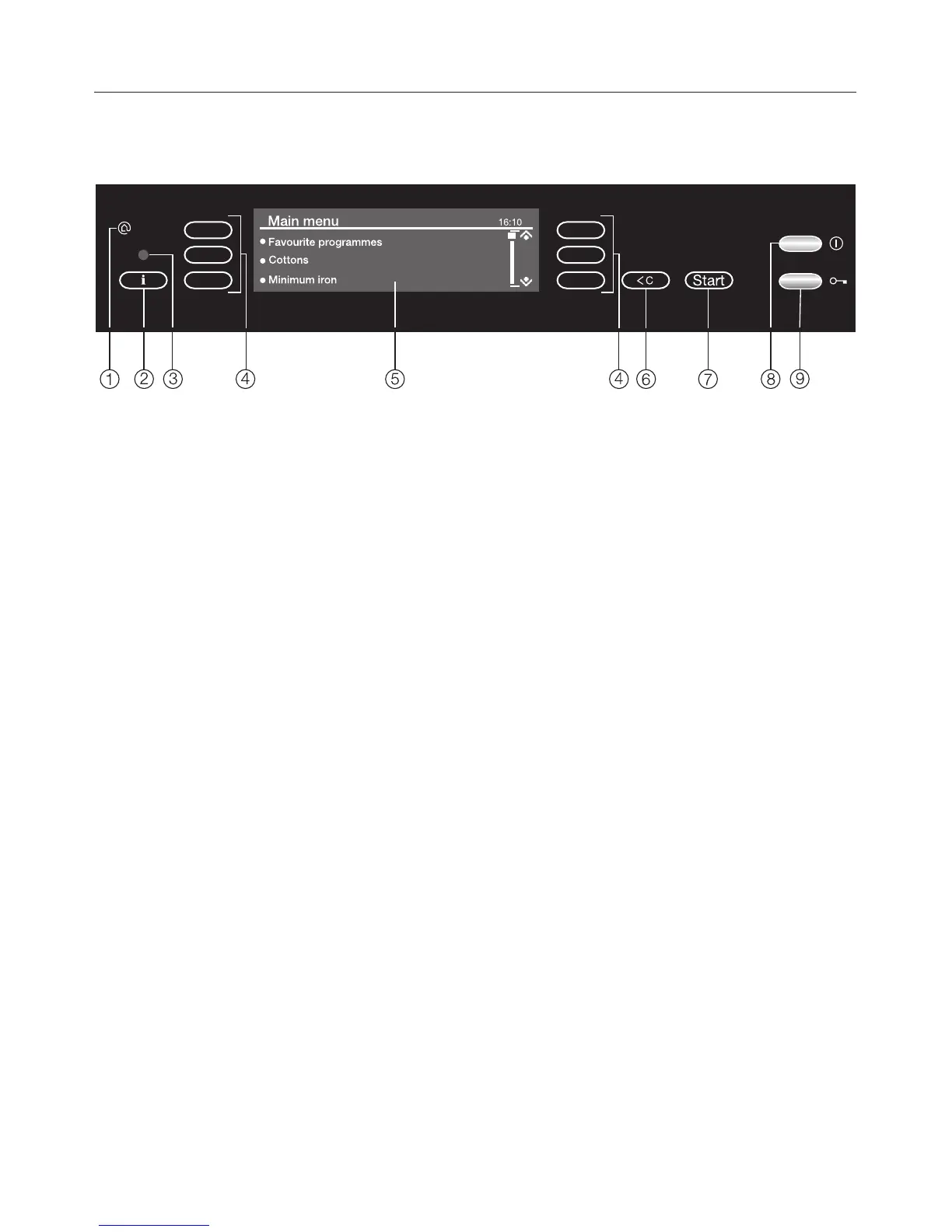
Control panel
a Miele{home
Symbol for Miele|home enabled
appliance
b Information sensor :
The sensor lights up when
information about the menu in the
display is available.
c Service interface
This is used by service technicians
to run diagnostic checks on your
machine, or to update programming
data in the future.
d Selector sensors
A sensor is active when it is lit up.
See next page for more information.
e Display
For showing:
–
the functions selected
–
the programme sequence
–
information
–
fault messages
f Clear sensor U
– For returning to the previous menu.
– For returning to the main menu when
touched twice.
– For deleting the values set
previously.
– For cancellinlg the wash
programme.
g Start sensor
The wash programme selected is
started by touching this sensor when
it is illuminated green.
h K button
For switching the washing machine
on and off.
To save energy, the washing
machine will switch itself off
automatically 15 minutes after the
end of the programme/anti-crease
phase or after being switched on, if
no other selection is made.
i / button
For opening the door.
Operating the washing machine
14








 To Next Page