Operating the tumble dryer
13
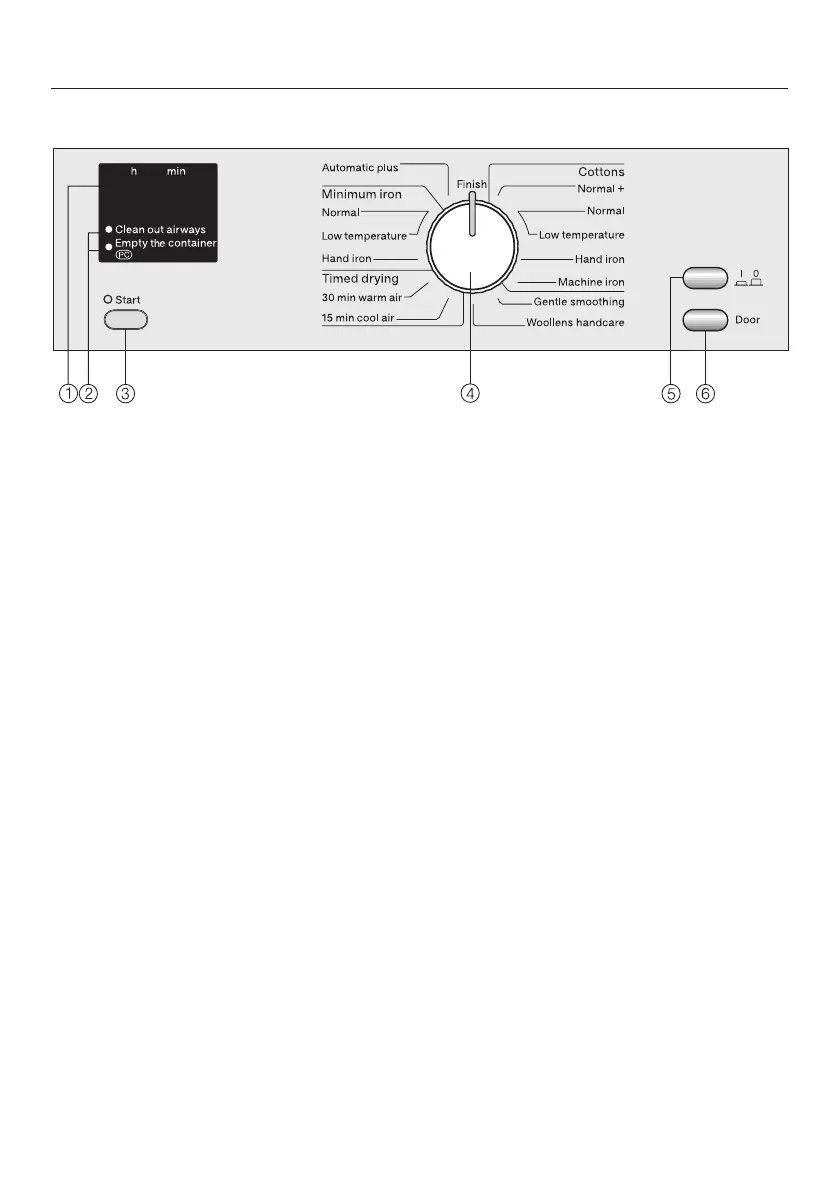
Control panel
a
Display h min
See the following page for more information.
b
Check / Fault indicator lights
See "Problem solving guide".
The PC check light is also used by service technicians to run diagnostic checks
on your tumble dryer and may be used to update programming data in the
future.
c
Start button
Press the Start button to start a programme.
The Start indicator light will flash as soon as the programme can be started. It
lights up constantly once the programme has started.
d
Programme selector
The programme selector can be turned clockwise or anti-clockwise.
e
On/Off button
For switching the appliance on or off.
or the programme duration will light up as confirmation that the tumble dryer
has been switched on.
f
Door button
Pressing this button will open the door even when the appliance is not switched
on at the mains.


 To Next Page