
 Need help?
Do you have a question about the Mighty Mule MM136 and is the answer not in the manual?
Warning about installing the keypad too close to the gate.
Description of the buttons and lights on the front of the keypad.
Description of internal parts like DIP switches and power input.
Procedure to pair the MM136 keypad with specific gate opener models.
Procedure to pair the MM136 keypad with MM271/MM272 openers.
Wiring diagrams for specific Mighty Mule control boards.
Wiring diagram for the Mighty Mule 360 control board.
Wiring diagrams for Mighty Mule 500 and 502 control boards.
Wiring diagrams for MM560, MM562, MM660, and PRO series control boards.
Wiring diagrams for MM271 control boards.
Wiring diagrams for MM262, MM362, MM462, FM202, PRO-SW2000XLS series.
General guidelines and rules for keypad programming.
Steps to change or set the master code for the keypad.
Steps to add new personal entry codes to the keypad.
Steps to add temporary entry codes with expiration.
Procedure to remove a specific entry code from the keypad.
Procedure to erase all stored entry codes from the keypad.
Description of how the keypad functions during normal use.
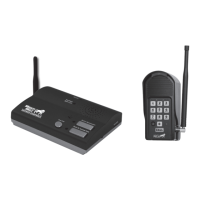
Description of the components on the front of the intercom base unit.
Description of the components on the bottom of the intercom base unit.
Instructions for connecting the rechargeable battery to the base unit.
Instructions for connecting the power transformer to the base unit.
Procedure to program ID codes for additional base units.
Steps to diagnose and resolve common issues with the intercom system.
 General
| Brand | Mighty Mule |
|---|---|
| Model | MM136 |
| Category | Intercom System |
| Language | English |

 To Next Page
