5
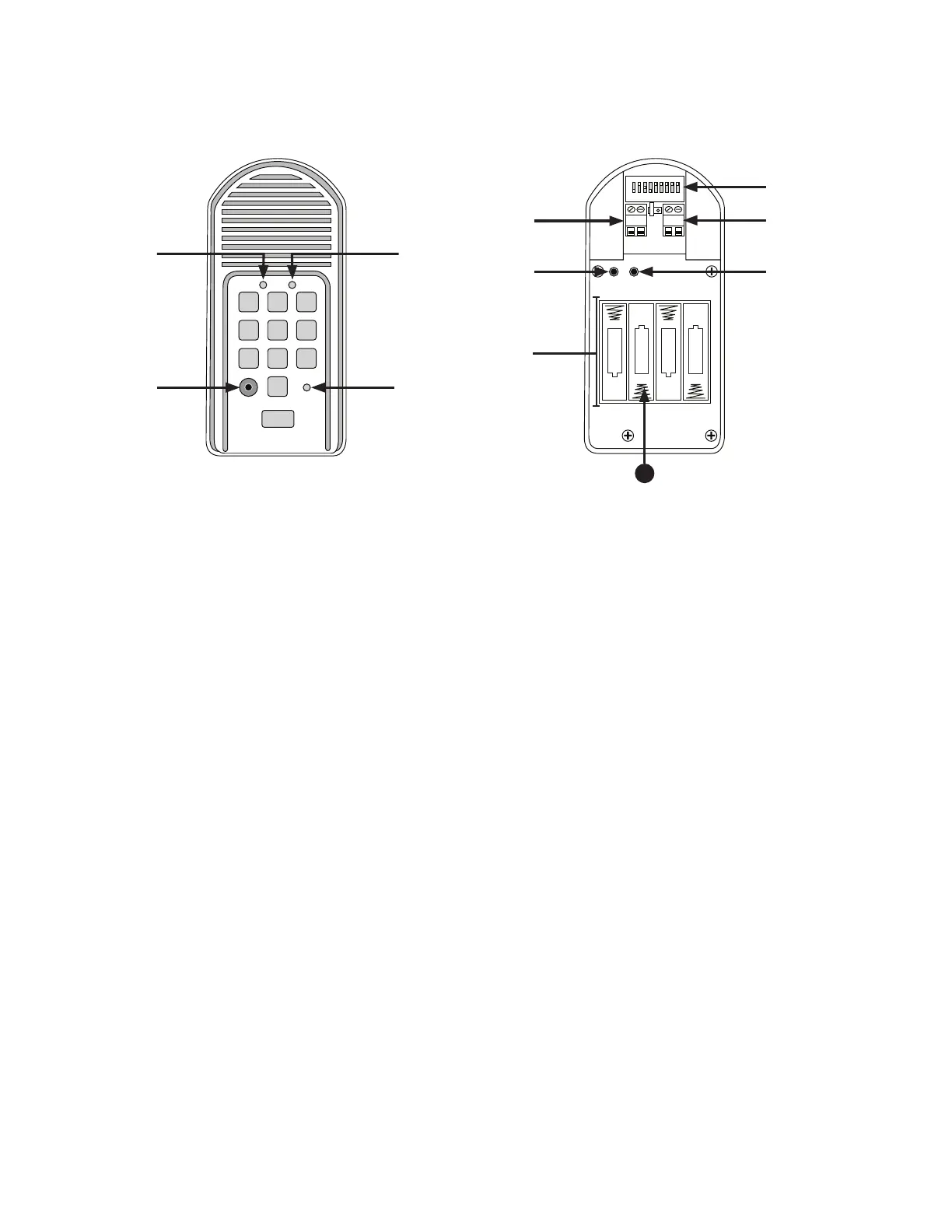
Keypad Description
Front
1. CALLING Light: LED is RED when calling and turns GREEN when call is answered.
2. GRANTED Light: LED turns GREEN when access permission is granted.
3. Program button: Used to program access codes.
4. Status Light: This led will blink once when any key is pressed and provides visual feedback during access code programming.
5. DIP Switches: Match these switches to your remote transmitter to program the keypad.
6. Power Input: Used to connect keypad to gate opener for continuous power supply.
7. Relay output: Used to connect Keypad to gate opener in hard-wired applications.
8. ID SET button: This button is used only when there is another pair of Mighty Mule wireless.
9. Reset button: Pressing this button for 2 seconds will reprogram key pad to factory settings. All codes are deleted. Default
master code is 1234.
10. Battery Holder: Use 4 AA batteries if hard-wired power supply is not used. If external power source is used the 4 AA batteries
will provide a back-up power source.
11. Installing Batteries
NOTE: Four (4) AA batteries (not included) are required to power the keypad (if being used wirelessly). If an external DC power
supply such as the gate opener’s power source is used, the AA batteries will act as a back up (although they are not required).
Low voltage wire from the gate opener battery must be connected to the POWER IN terminals on the keypad control board.
Step 1: Remove the two screws from the bottom of the keypad and separate the keypad from its housing.
Step 2: Install four (4) AA batteries as necessary (not included).
1 2
ABC
3
DEF
4
GHI
5
JKL
6
MNO
7
PRS
8
TUV
9
WXY
0
CALL
STATUS
PROGRAM
CALLING
GRANTED
RELAY
OUTPUT
AC/DC
POWER IN
123456789
+
0
–
ID SET
+
–
–
–
+
+
–
+
RESET
JUMPER
Inside
11


 To Next Page