
 Need help?
Do you have a question about the Mikado VBAR EVO and is the answer not in the manual?
Lists key features like easy setup, online updates, and built-in governor for electric helicopters.
Details FCC regulations, interference warnings, and RF exposure compliance requirements for the device.
Warns about rotor blade dangers and emphasizes following manufacturer safety guidelines for helicopters.
Advises against operating in wet conditions and stopping flights due to vibrations.
Recommends disconnecting motor wires, ensuring sufficient power supply, and verifying fail-safe settings.
Lists essential components for initial installation, including VBar EVO, radio, power supply, and helicopter setup tools.
Enumerate the items included in the VBar EVO package: VBar EVO unit, USB C wire, and Gyro Pad.
Guides users through updating and registering the VBar EVO and VBar Control via the VBar Control Manager.
Explains how the VBar enters bind mode and references the VBar Control Manual for the binding process.
Details the purpose of each connector on the VBar, such as ESC, servos, RPM, and USB.
Clarifies that power can be connected to any port and notes specific requirements for RPM sensors.
Instructs users to verify the correct directional movement of the swash plate and tail rotor before flight.
Describes the VBar's self-test during initialization, including LED indicators and helicopter state.
Guides users on proceeding to the maiden flight after successful initialization and pre-flight checks, allowing field adjustments.
Details the automatic trim flight process for helicopter setup and optimal weather conditions for performance.
States the manufacturer's disclaimer regarding liability for content and user assumption of operational risks.
Lists key technical data, including supply voltage, current consumption, operating temperature, and physical dimensions.
Provides information on obtaining support, including the online manual, forums, and contact details.
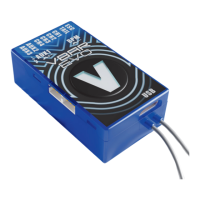
The VBar EVO is an innovative product designed to set new standards for model helicopters, offering advanced flight performance and extensive programming capabilities. It functions as a sophisticated control unit for flybarless model helicopters, integrating a VBar Control VLink Receiver for seamless communication with a VBar Control radio. This device is specifically engineered to enhance the stability, precision, and overall flight experience of RC helicopters.
The primary function of the VBar EVO is to act as the central flight controller for model helicopters, replacing traditional flybar mechanisms with electronic stabilization. It processes inputs from the pilot via a VBar Control radio and translates them into precise commands for the helicopter's servos, ensuring stable and controlled flight. The device includes a built-in governor for electric model helicopters, which helps maintain consistent rotor RPM during flight, contributing to stable performance. For internal combustion (IC) powered models, the Pro firmware is required to utilize the governor function.
The VBar EVO is designed for use with digital servos only, ensuring compatibility with modern, high-performance servo systems. It manages the swash plate servos (CH1-4) according to software diagrams, controls the tail servo, and supports additional functions through AUX1-3 ports. An RPM sensor input allows for accurate RPM monitoring, crucial for the governor function. The device also features a USB C port for connection to a computer, facilitating updates and configuration, and TELE 1, TELE 2 ports for the VBar Control telemetry bus, enabling real-time data feedback to the pilot.
The VBar EVO offers a user-friendly experience, particularly when paired with a VBar Control radio. Setup and fine adjustments are made easy through the VBar Control radio interface, eliminating the need for complex PC-based configurations during routine use. The device is ready for online updates, ensuring that users can always access the latest features and improvements as they become available.
For initial setup, the VBar EVO goes into bind mode approximately 10 seconds after power-up, indicated by a flashing green-red LED, signifying its readiness for binding with a VBar Control Transmitter. The binding procedure is detailed in the VBar Control Manual.
During initialization, the VBar EVO performs a self-test, indicated by a flashing blue LED. The helicopter must remain at rest during this process. Upon completion, a brief twitching (jump) of the swash plate occurs, and the VBar Control will display 'Connect', with the V LED lighting up solid green, indicating successful initialization.
The VBar EVO supports a "trim flight" feature, which automatically performs necessary trims for the helicopter's elevator, aileron, and tail. This is particularly useful if servo linkages are not perfectly installed or if the center of gravity is slightly off. To initiate a trim flight, the helicopter is turned on with the collective stick at full positive, confirmed by a short double-twitch of the swash plate. Trim flight can be enabled in the Flight Parameters menu on VBar Control. Detailed information on trim flights is available through the "Trim flight info" in the flight menu, vstabi.info, or the online help on VBar Control Touch.
The device emphasizes safety, requiring users to disconnect motor wires or remove the pinion gear during speed controller (ESC) setup or when loading unknown setups to prevent accidental spooling up. It also automatically sets fail-safe conditions, ensuring the motor is off and servos are in a hold position in case of signal loss.
Maintaining the VBar EVO involves periodic updates and careful handling. The device is designed for online updates, which can be performed by connecting it to a computer via the USB C wire and using the VBar Control Manager software. During an update, the LED flashes white, then yellow briefly, and finally green. After disconnecting the USB wire and power cycling, the VBar EVO starts up for normal operation, flashing blue during initialization and then red-green. If connected to a computer, it will automatically enter update mode again when power cycled, facilitating access to the App Store and registration.
Registration of the VBar EVO to a MikadoID is done through the Applications section of the VBar Control Manager, allowing users to manage their device and access additional features. It is also recommended to update the VBar Control radio itself to ensure full compatibility and access to the latest functionalities.
Proper mechanical assembly of the helicopter is crucial for optimal performance and to avoid issues. The manual stresses the importance of exact symmetry and geometry during assembly, as flybarred rotor systems are not supported. Before each flight, a pre-flight check is mandatory, requiring users to double-check the active direction of the swash plate and tail rotor by moving the helicopter along its three axes.
The VBar EVO is not designed for operation in wet conditions (high humidity or rain). If the helicopter exhibits vibrations during flight, operation must cease immediately, and the cause of vibration must be eliminated before further flight. This proactive approach to maintenance helps prevent damage to the model and ensures safe operation.
For further applications and additional functions, users are directed to the App in VBar Control and the online manual available on www.vstabi.info. Support is also available via email at service@mikado-heli.de and vstabi@mikado-heli.de, as well as through an extensive online forum.
 General
| Type | Receiver |
|---|---|
| Manufacturer | Mikado |
| Product Name | VBAR EVO |
| Voltage Range | 3.5V - 8.4V |
| Telemetry | Yes |
| Range | Full Range |
| Compatibility | Helicopters |

 To Next Page