iMap10.0
A0
Robot Vacuum
User
M
a
n
ual
LSB1
Thank you for purchasing this product.
Please read the user guide carefully before use.
2. Product Overview
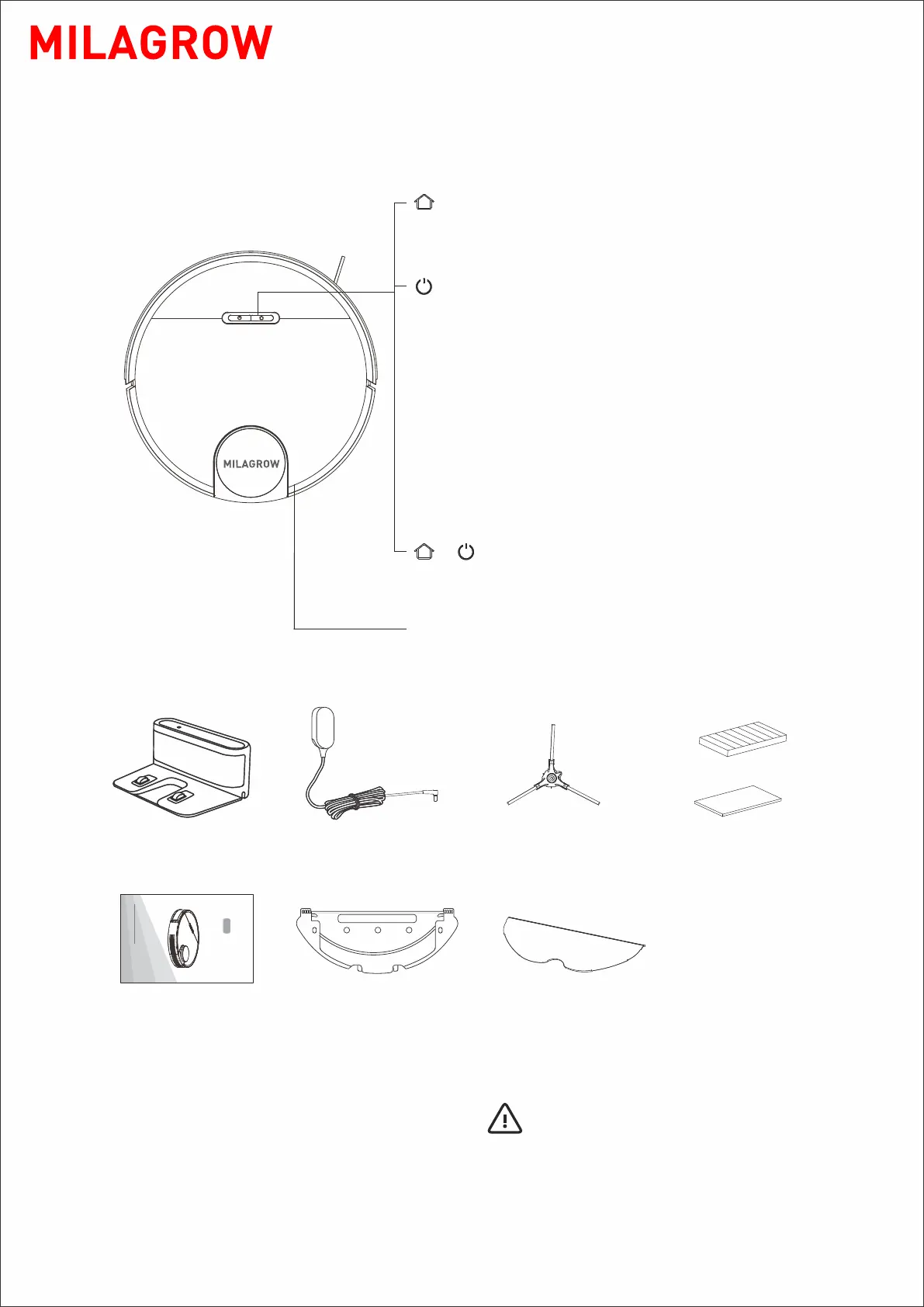
2.1 Robot and its accessories
Accessories
Robot
- 05 -
* A side brush and a filter combination
as well as a battery have been
installed in the robot.
Tips:
Charging dock×1 Power adapter×1
User manual×1
Mopping cloth×1
Filter combination×1
Mopping cloth×1
Side brush×1
+
• Press to return for charging. Press again to pause
• Press and hold for 3 seconds to start Spot Cleaning
Recharge button
Sweep/on/off button
Flip port
• Press and hold for 3 seconds to turn on or off (if
it's not being charged)
• Press to start sweep
• Press to pause the task being performed
Power Indicator
Recharge button + on/off button
• White: Battery level ≥20%
• Pink: Battery level < 20%
• Blinking like breathing: Being charged or started
• Blinking fast in red: Fault
• Press and hold both buttons simultaneously
for 3 seconds to reset Wi-Fi connection



 To Next Page