- 13 -
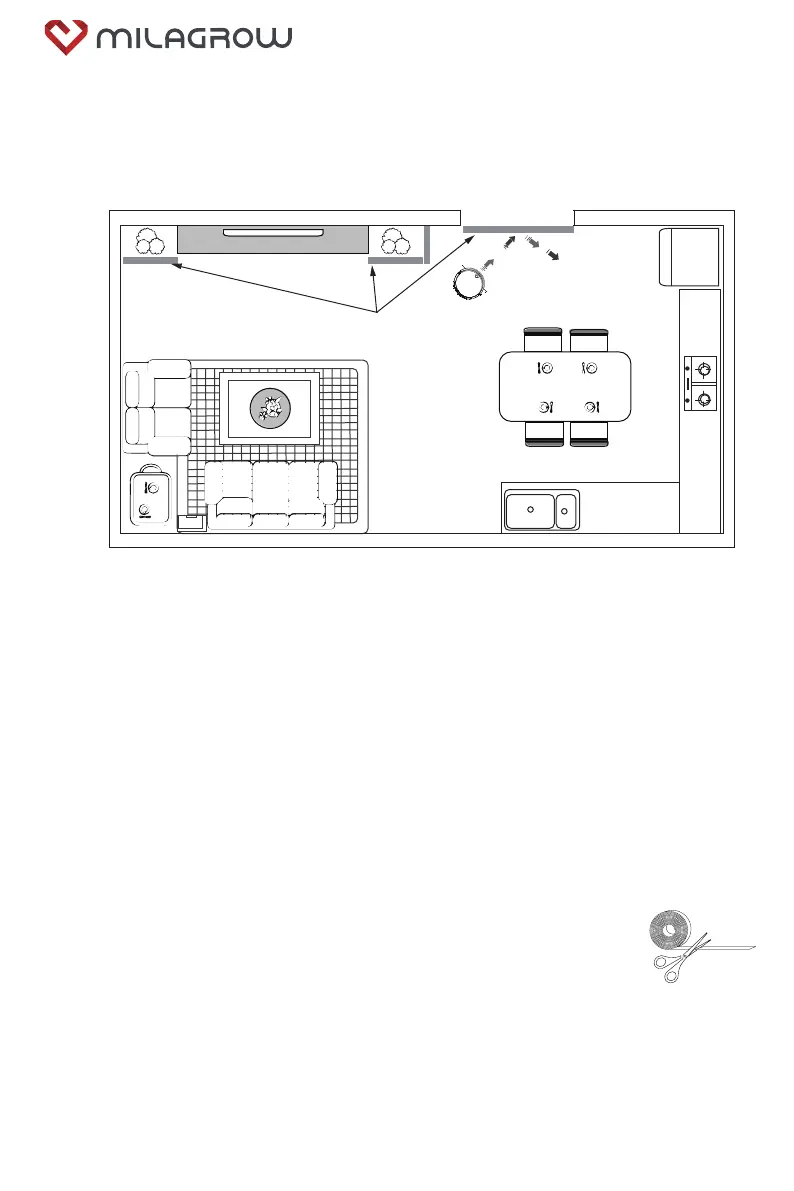
Use the Magnetic Boundary strips to quickly and easily create “no-go zones”
to keep ROBOT out of the areas you would like it to avoid.
These may include:
•
Near power cords that might cause tangles
•
Fragile objects that may be damaged.
•
Doorway thresholds.Your robot can easily climb over most common thresholds.
However in some situations they may present a challenge.
Use the boundary strips to block off these areas.
•
Around furniture with low or narrow space that may trap your robot.
Remark
1, If the Boundary strip is too long for no-go area,cut it 50cm Minimum to the
desired length so that it covers the entire perimeter of an object or
spans the length of the doorway you want to block off.
2, Place the strips on the floor or around an area rug to create
perimeters around the objects and areas you’d like to block.
NOTE: If blocking an object, place the Boundary strip
5cm in front to ensure ROBOT will not bump into it.
4.5
Use of Magnetic boundary strip
ELC
NA
Magnetic boundary strips
Attention pls
!
Always put the magnetic boundary strip FLAT on the ground to
make it effective.Cut off the extra length when need.
BlackCat 21/RedHawk 21



 To Next Page