MILESTONE
USER MANUAL
ETHOS EZ User manual MA073-006 Terminal chapter Page - 57 -
Open Sample table
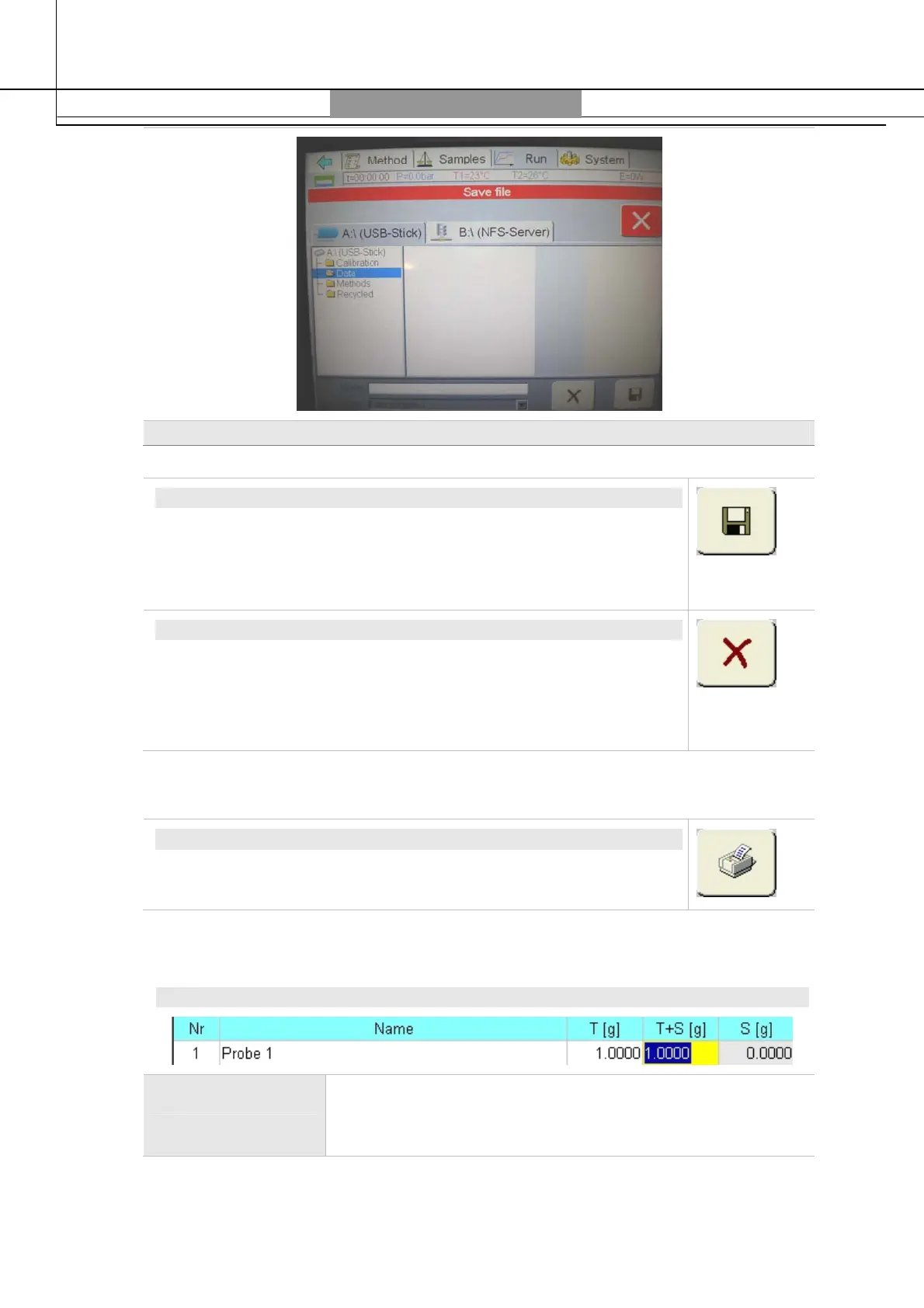
SAVE SAMPLE REPORT/TABLE
Enter in the
Name
box the sample designation (max. 15 characters).
The ending
.tbl
(for Table) will be automatically added at the end of
the name. Touch the
Save
box to save the current table and close
the window. Always save sample data under directory
A:\Data
.
DELETE SAMPLE TABLE
Select from the list the sample tables you want to delete. The name
will show in the
Name
field.
Touching the
X (Delete)
icon – after request to reconfirm – the
method will be deleted. A deleted method is lost forever.
Print Sample Table
PRINT SAMPLE TABLE
Touching this icon will open an anteprima of the Print-Report.
Renewed touching of the print icon will print out the sample report.
Edit Sample Table
EDIT SAMPLE TABLE/REPORT
Color Code All grey-colored fields are protected and cannot be
overwritten. The white ones can be written on. A yellow
background indicates an activated field.


 To Next Page