System
Elix® Essential 3, 5, 10, 15 (UV) / RiOs™ Essential 5, 8, 16, 24 21
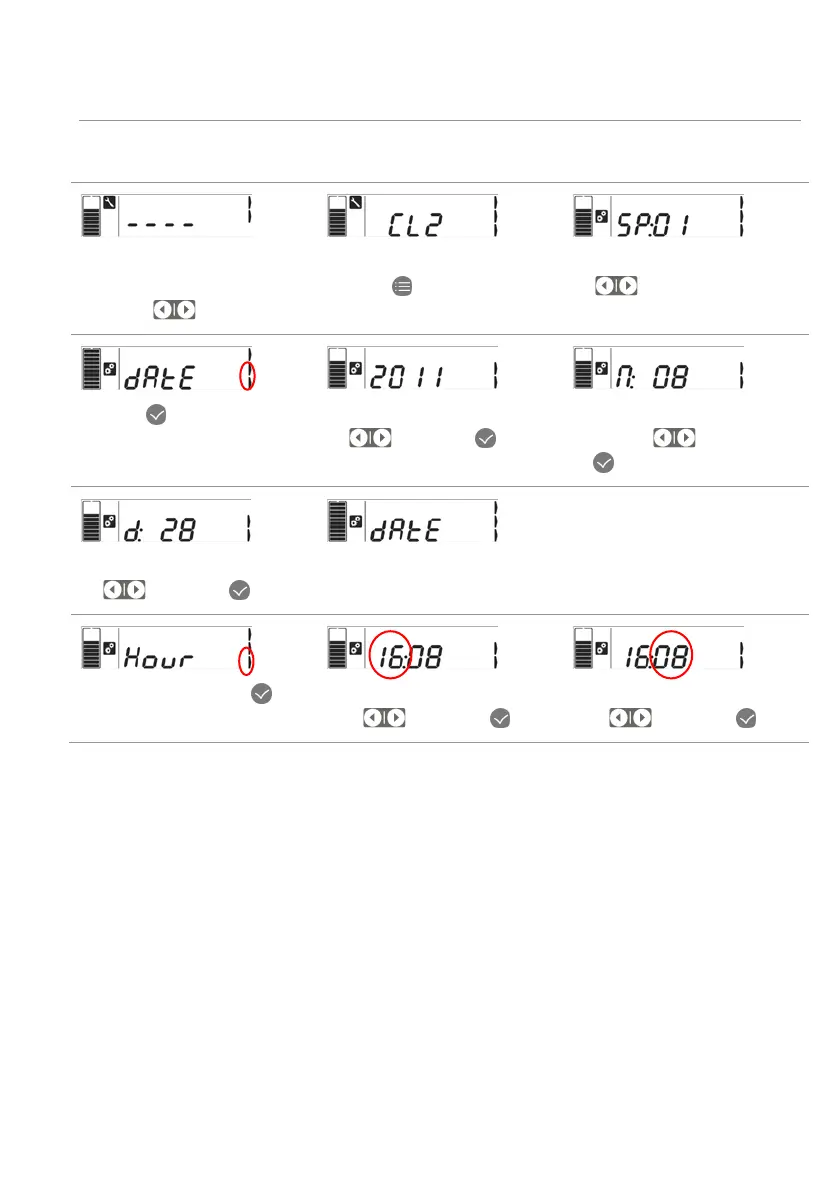
An example of a configuration change: the DATE (YYYY, MM, DD) and TIME (00:00).
1- System is in STANDBY
mode. Press on right
arrow
.
2- In maintenance menu,
press
.
3- Press on right arrow
until the date
menu is displayed.
4- Press
to enter dAtE
menu.
5- Change year with arrows
and press .
6- Change month with
arrows
and press
.
7- Change day with arrows
and press .
8- The date is set now.
9- Set the time. Press
.
10- Change with arrows
and press .
11- Change with arrows
and press .






 To Next Page