Preface
Elix® Essential 3, 5, 10, 15 (UV) / RiOs™ Essential 5, 8, 16, 24 5
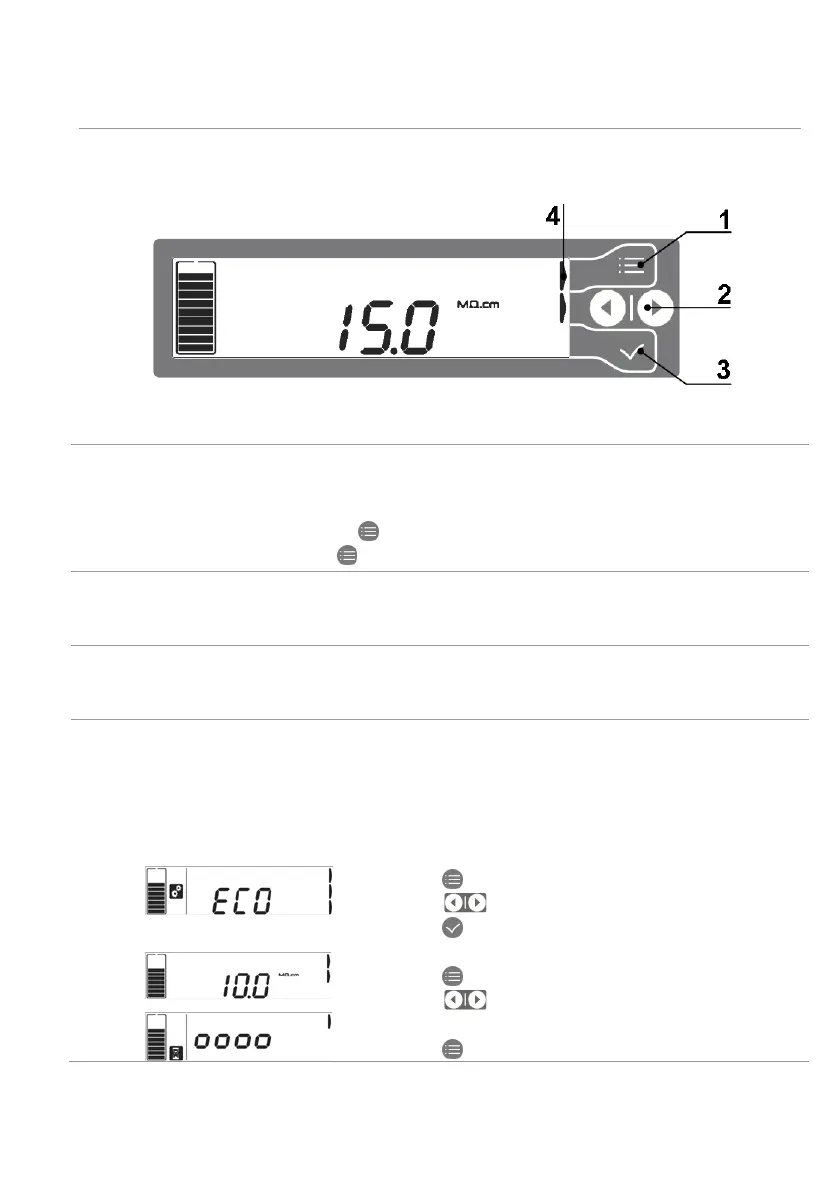
Keypad usage
The keypad and its usage are explained below.
Item Function
1 MODE key
• This button is used to switch between different system modes: Standby mode,
Ready mode or in Configuration mode.
• From Standby, press twice to go to Ready.
• From Ready, press once
to go to Standby.
2 LEFT or RIGHT key
These buttons are used to navigate in the user interface software. They are also used
to change configuration or set point values.
3 VALIDATE key
This button is used to confirm a change or an action required by the water system. It
is also used to save any changes made in configuration.
4 HELP INDICATOR icon
• There are up to 3 of these icons on the display depending upon the software mode.
These indicators are here to tell the user which keypad button is available and
active.
See the examples below:
3 help indicators:
• Press on (Mode key) to switch operating mode.
• Press on to navigate in the software branch.
• Press on (Validate key) to configure ECO mode.
2 help indicators:
• Press on (Mode key) to switch operating mode.
• Press on to navigate in the software branch.
1 help indicator:
• Press on (Mode key) to switch operating mode.







 To Next Page