16 MW150 & MW151 Bench Meters
6. GENERAL OPERATIONS
6.1. POWER CONNECTION & BATTERY MANAGEMENT
MW150 and MW151 can be powered from the supplied 12 VDC adapter, through a PC USB
port orstandard 5V USB charger (MW151 only) or from the built-in rechargeable battery.
The built-in rechargeable battery provides about 8 hours of continuous use. Fully charge
the battery before first use.
To conserve battery, the meter will turn o automatically after 10 minutes of inactivity.
Toconfigure this option see Auto O in GENERAL SETUP section.
y Press ON/OFF to turn the instrument on.
All LCD segments are displayed briefly and the instrument enters measurement mode.
y After measurement, switch the meter o, clean the electrode and store it with a few
drops of MA9015 storage solution in the protection cap.
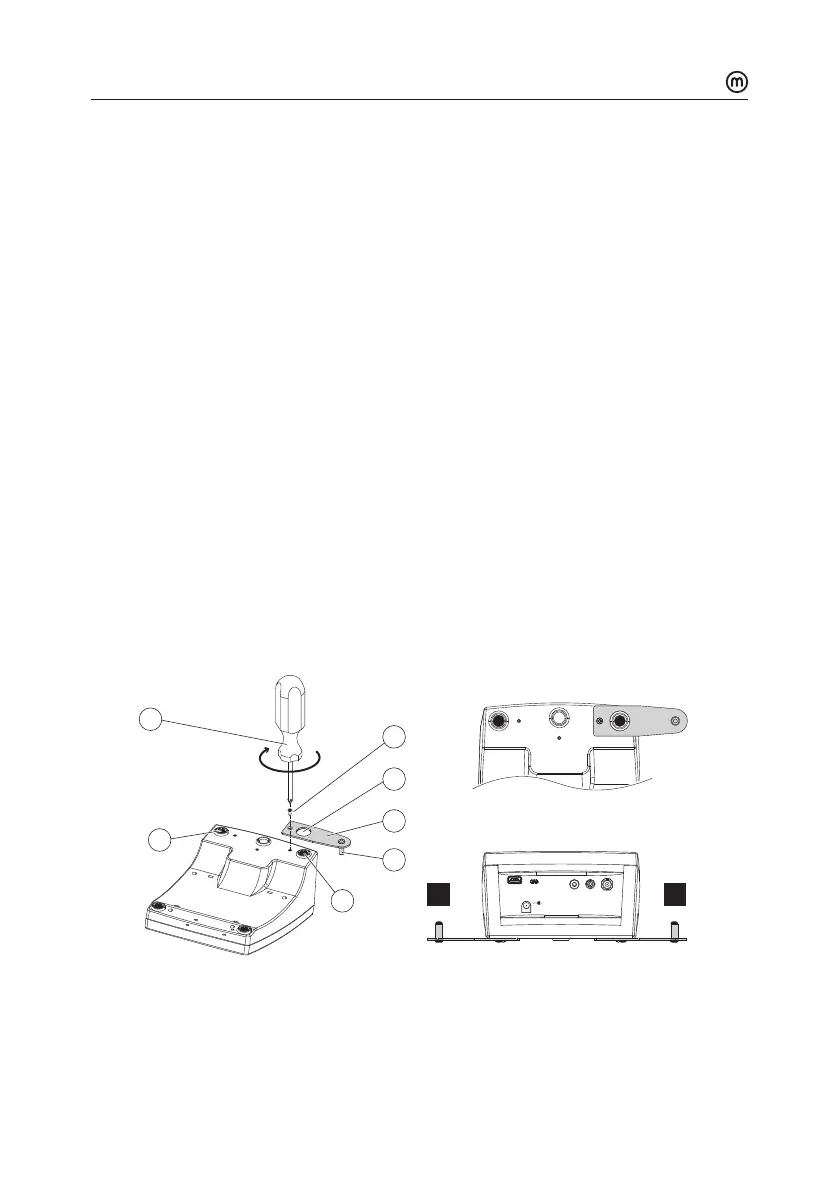
6.2. MOUNTING THE ELECTRODE HOLDER
y Take the MA9315 electrode holder from the box.
y Identify the metal plate (4) with the integrated pin (5) and the screw (2).
The plate may be attached to either sides of the meter, left (L) or right (R).
y Turn the meter over, with the display facing down.
Ref. Temp.
pH/ORP
POWER
12Vdc
USB
DEVICE
USB
HOST
1
2
3
4
5
6L
6R
R
L
y Align the rubber foot (R or L) with the hole (3) on the plate (4). Make sure the pin(5)
is facing down.
y Use a screwdriver (1) to tighten the screw (2) and lock in place.



 To Next Page