30 MW150 & MW151 Bench Meters
8.3. MEASUREMENT
Remove the probe protective cap and place the tip approximately 4cm (1 ½”) into the
sample. It is recommended to wait for the sample and the pH probe to reach the same
temperature.
If necessary, press the RANGE/ until the display changes to the pH mode. Allow the
reading to stabilize (
stability tag to turn o).
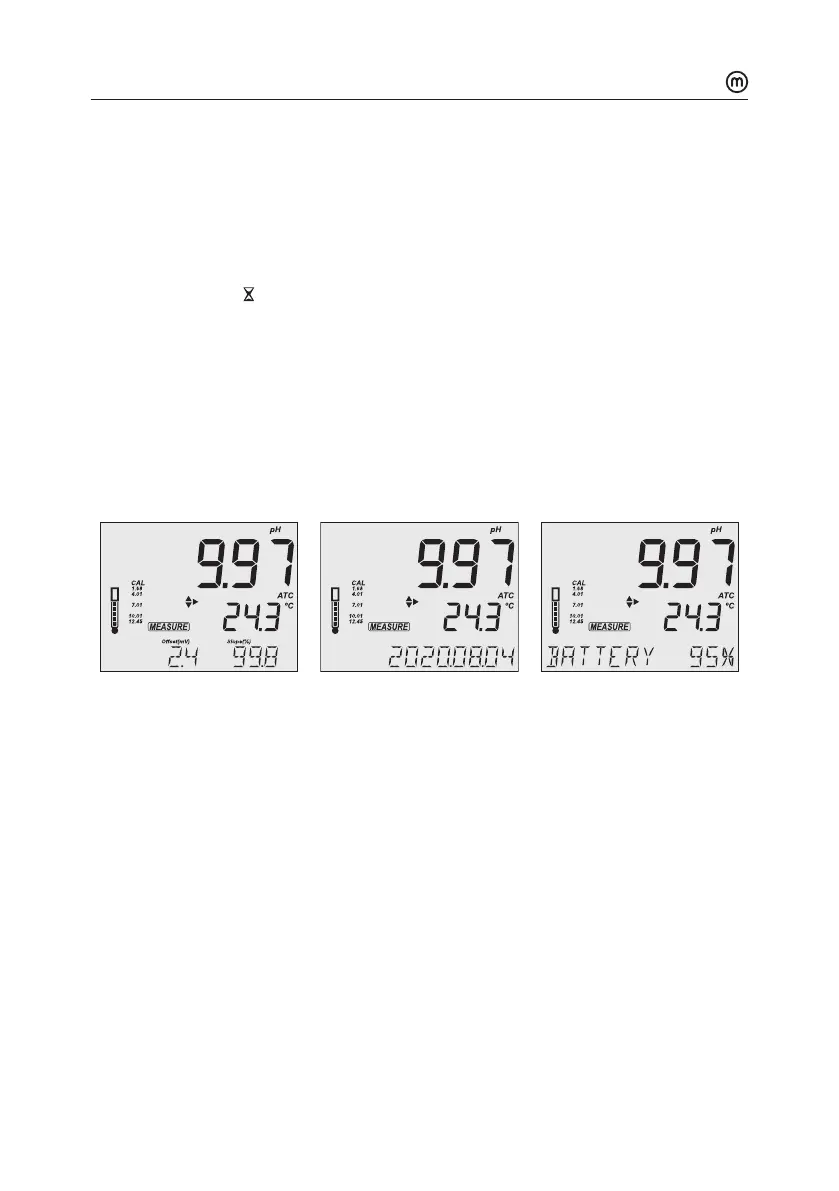
The LCD will display:
y Measurement and temperature readings.
y Temperature compensation mode (MTC or ATC).
y Buers used (if option enabled in Setup).
y Electrode condition (if option enabled in Setup, MW151 only).
y The third LCD line displays: mV oset & slope values, time and date of measurement,
battery status. Use the keys to scroll between them.
For best results is recommended to:
y Calibrate the probe before use and recalibrate periodically
y Keep the electrode hydrated
y Rinse the probe with the sample before use
y Soak in MA9015 Storage solution for at least 1 hour before measurement
MTCmode
When the probe is not connected the “NO T. PROBE” message is displayed. The MTC tag
and the default temperature (25 °C) with blinking temperature unit are displayed.
1. Press CAL/EDIT and use the keys to set the temperature value manually.
2. Press GLP/ACCEPT to confirm or press ESC (or CAL/EDIT again) to exit without saving.



 To Next Page