OPERATING INSTRUCTIONS
TURN ON/TURN OFF
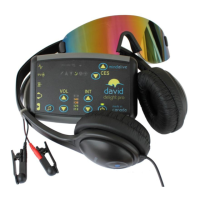
Press and hold the power button ( ) until the power LED turns on. The graph
(between the VOL and INT controls) will display the battery level when you
first turn on the unit (see Battery Level). If no session is selected within two (2)
minutes, the Delight Plus will turn off.
At the end of a session, the lights and sound will fade out (Soft Off™) and the
Delight Plus will automatically turn off. To end a session early, press and release
the power button ( ) to initiate a short Soft Off™ (30 seconds).
To turn off the Delight Plus at any time, press and hold the power button ( )
until the unit turns off. This may take up to three (3) seconds if a session is
running.
BATTERY LEVEL
The battery level is displayed on the graph for a couple of seconds when the
Delight Plus is first turned on. The battery level is also monitored and displayed
periodically while the session is running.
When the battery level is getting low, the graph will display two (2) blinking
bars. It is recommended that you replace the battery before running a session if
this warning is displayed.
When the battery level is critically low, the graph will display a single (1)
blinking bar. If this warning is displayed when you turn the unit on, replace the
battery. If this warning occurs during a session, the session will end early, and
the battery indicator will continue to blink for a short period of time. The
battery must be replaced before the unit can be used again.
SELECTING A SESSION
The Delight Plus has six (6) session groups ( , , , , , ). Each group offers
five (5) sessions except . The session number is indicated by the lit number
between the volume and intensity controls. If no number is lit, then the group
has no session programmed into it.
Press and release the power button ( ) to
switch between groups. The lit group icon will
change. Press the volume or intensity or
to highlight a session number. If no sessions are
available in a group, no numbers will be lit.
Press to start the selected session. The session will begin after a five (5)
second delay.



 To Next Page