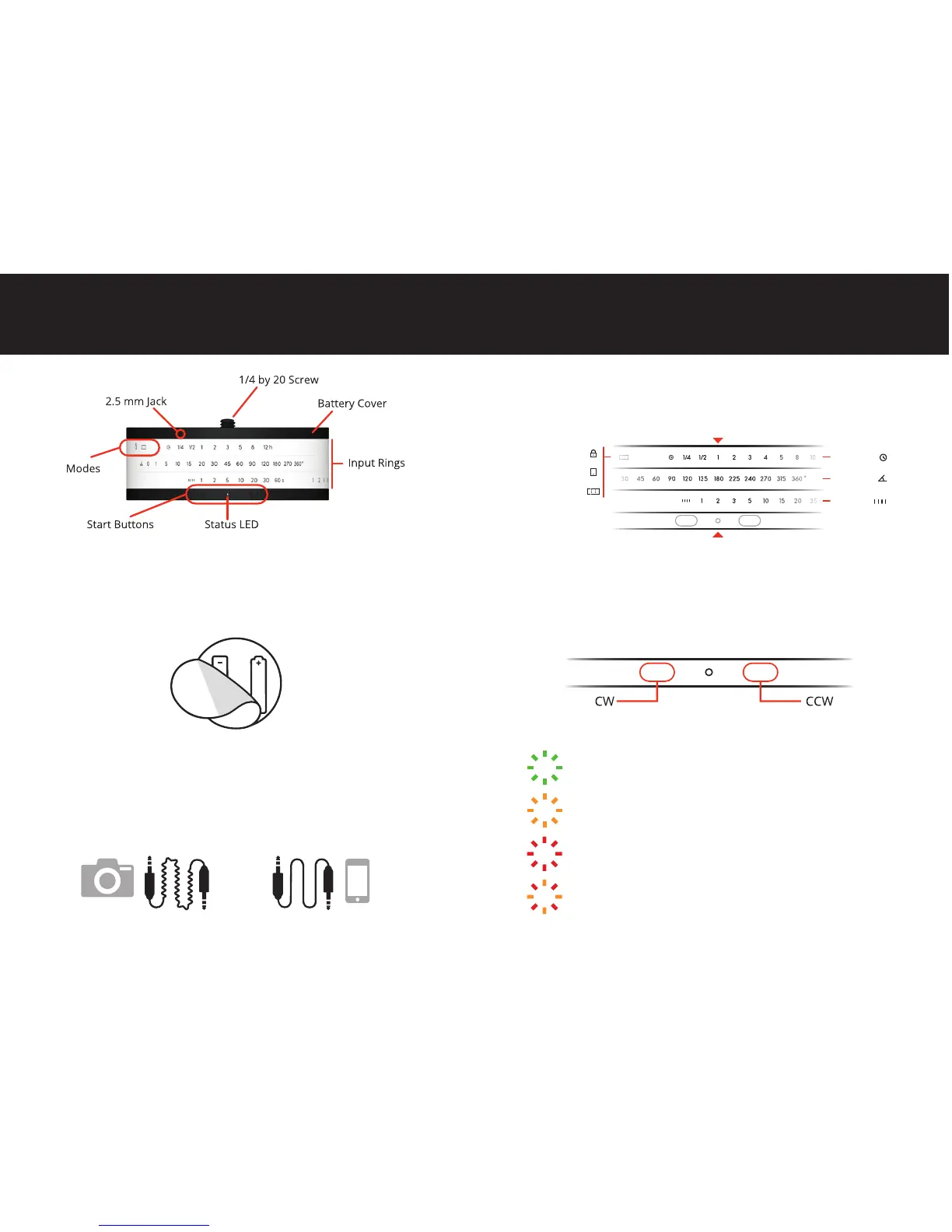
Single Blink: The LED flashes every time Astro moves.
Fast Blinking: Smartphone Mode. Waiting for
smartphone program transfer.
Fast Blinking: Error starting program.
Continuous: Canceled program.
Fast Blinking: Replace batteries.
Astro has three input rings. Align them with the Satus LED to set a
mode or create a program.
Press one of the two Start Buttons to start running the program in
the desired direction (CW or CCW). Long press to make Astro move
continuously to adjust its position. To cancel a program, press either
one of the buttons for five seconds until the LED turns red.
Programming
Start Buttons
Status LED
6
Smartphone
Panorama
Lock
Duration
Rotation
Interval
Peel back the rubber Battery Cover on top of Astro and insert
two AA batteries.
Astro comes with two cables:
The Camera Cable has a specific connector for your camera on one
end, and a plug on the other that connects to the 2.5 mm Jack in Astro.
The Smartphone Cable connects to your smartphone’s headphone
jack on one end, and to Astro through the 2.5 mm Jack.
ANATOMY
Batteries
Connectivity
5
We recommend using high capacity, lithium rechargeable batteries.



 To Next Page