EasyManua.ls Logo

Mindray M9Vet - User Manual

Mindray M9Vet
2 pages
Print Icon
To Next Page IconTo Next Page
Loading...
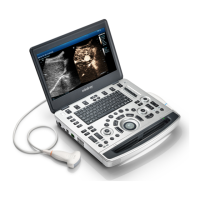
M9Vet Quick Guide
1
11
1 B mode 30 Steer/Invert
2 Power mode 31 Cine
3 Color mode 32 Clear
4 CW mode 33 Patient information
5 PW mode 34 Probe/Exam switch
6 TDI 35 Review
7 M mode 36 End Exam
8 Update 37 Soft key1
9 Caliper 38 Soft key2
10 Measure 39 Soft key3
11 Set 40 Soft key4
12 Set 41 Soft key5
13 Single Window 42 Soft key6
14 Zoom 43 Menu page turning
(backward)
15 Dual Window 44 Mode switching
16 Focus Position 45 Menu page
turning
(forward)
17 Depth 46 Numerical keyboard
18 Gain/iTouch 47 Power switch
19 User-defined key1 48 TGC slider
20 Save 49 Standby indicator
21 Freeze 50 HDD indicator
22 Body Mark 51 AC power indicator
23 User-defined key 3 52 Battery indicator
24 User-defined key 2 53 Trackball
25 Cursor 54 iStation
26 Baseline 55 Report
27 Scale 56 Stress Echo
28 Angle/Quick Angle 57 Setup

29
Steer/Invert
58
Text comment

Other manuals for Mindray M9Vet

Questions and Answers

  • D
    Dawn WardAug 9, 2025
    What to do if the power indicator blinks on my Mindray Medical Equipment?
    • J
      James CooperAug 9, 2025
      If the AC indicator is on, but the power on/off indicator is off or blinking after pressing the button on your Mindray Medical Equipment, the cause may be an error from the main board of the power supply. The suggested solution is to replace the main board.
  • D
    David HurstAug 16, 2025
    Why is my Mindray M9Vet Medical Equipment running on battery when plugged in?
    • A
      alexanderstewartAug 16, 2025
      If the system power supply adaptor AC power indicator remains off, and the Mindray Medical Equipment starts using battery power, there are two potential causes: either there is no AC input, or there is an error from the power supply adaptor. To resolve this, first, re-check the AC connection. If the problem persists, replace the power supply adaptor.
  • M
    Mathew LeeAug 25, 2025
    What to do if Mindray Medical Equipment doesn't work on battery?
    • S
      Sharon TaylorAug 25, 2025
      If your Mindray Medical Equipment only works when connected to the power supply adaptor and fails to operate solely on battery power, it could be due to low battery capacity or a battery module error. First, try charging the battery module. If the issue persists, consider replacing the battery module.
  • L
    Lorraine BeanSep 1, 2025
    How to fix Mindray Medical Equipment when AC power indicator is off?
    • S
      Scott KirkSep 1, 2025
      If the AC power indicator remains off and your Mindray Medical Equipment starts using battery power, there could be two potential causes: either there is no AC input, or there is an error from the power supply adaptor. First, re-check the AC connection. If the problem continues, replace the power supply adaptor.

Summary

Getting Started

New Patient Setup

Process of adding a new patient and filling in basic animal information for the examination.

Scanning Modes

Measurement Procedures

Post Scanning Operations

Annotating Images

Adding comments and body marks to the image for documentation and identification purposes.

Saving and Reviewing Images

Saving captured images or cine clips to the system for later review or transfer.

Report Generation and Printing

Generating reports, adding text and images, and printing the examination results.

Concluding Examination

Procedure for formally concluding an ongoing patient examination.

Image Management and Transfer

Image Transfer Process

Transferring images from the system to external storage like USB or DICOM.

Mindray M9Vet Specifications

General IconGeneral
RAM4 GB
Storage500GB hard disk
Transducer Ports2
Operating SystemWindows Embedded
Supported ProbesLinear, Convex, Phased Array
PortsUSB
Display15-inch LED-backlit LCD
Transducer CompatibilityCompatible with a wide range of transducers

Related product manuals