miniDSP Ltd, Hong Kong / www.minidsp.com / Features and specifications subject to change without prior notice 25
8.1.3 Turn ON/OFF Direction of Arrival (DOA)
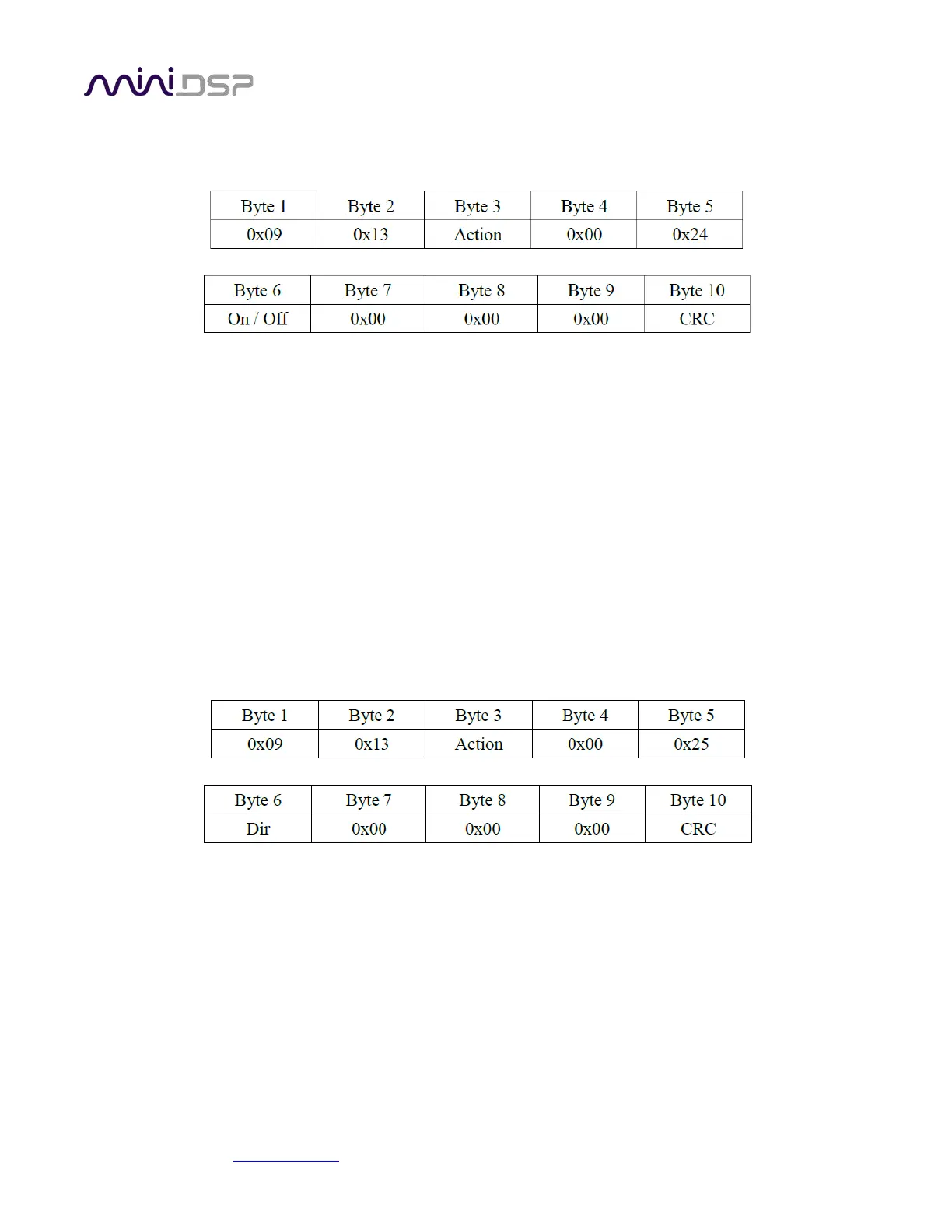
To turn on / off DOA detect, send the command through USB to
Action = 0xA0 , load values to DSP but not load to memory
Action = 0x80 , load values to DSP and memory
On / Off = 0x00 (to turn off DOA detect)
On / Off = 0x01 (to turn on DOA detect)
CRC = sum of all bytes except the CRC byte itself (i.e. Byte 1 +
Byte 2 + Byte 3 + ... + Byte 9)
For example to turn on DOA detect (and to keep it turned on even after power-cycled, use Action = 0x80), send
this command: 09 13 80 00 24 01 00 00 00 C1
8.1.4 Set Direction of Arrival (DOA)
To set DOA direction, send the command through USB to MicArray:
Action = 0xA0 , load values to DSP but not load to memory
Action = 0x80 , load values to DSP and memory
Dir = an integer number representing a direction
(valid range is 1 ~ 6 for six directions)
CRC = sum of all bytes except the CRC byte itself (i.e. Byte 1 +Byte 2 + Byte 3 + ... + Byte 9)
For example to set DOA direction to number 1 (and to keep this setting even after power-cycled, use Action =
0x80), send this command: 09 13 80 00 25 01 00 00 00 C2


 To Next Page