miniDSP Ltd, Hong Kong / www.minidsp.com / Features and specifications subject to change without prior notice 28
4. Click on the Browse button, navigate to the folder XMOS_Firmware in the plugin download folder, and
select the firmware file.
5. Click on the Start button.
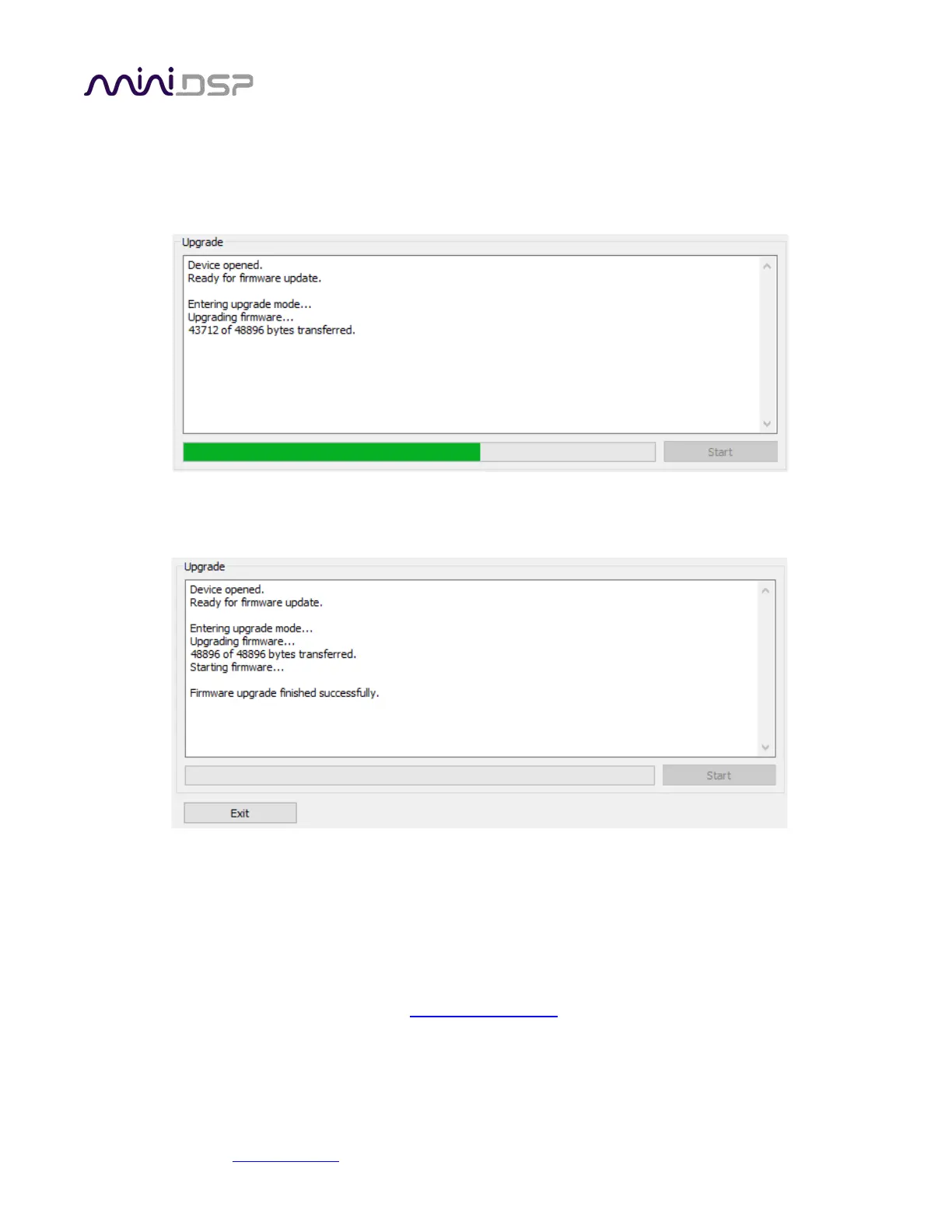
6. You will get a progress bar as upgrade proceeds:
7. Once the firmware upgrade completes, you will see a message that the upgrade completed successfully:
8. Click on Exit.
9. That’s it! You’re done. You can now use your 2x4 HD with the new functionality.
9.3 OBTAINING SUPPORT
1. Check the forums on miniDSP.com to see if this issue has already been raised and a solution or solutions
provided.
2. Contact miniDSP via the support portal at support.minidsp.com
with:
a. The product information including OS version and version of driver installed (for Windows).
b. A clear explanation of the symptoms you are seeing.
c. A description of the troubleshooting steps you performed and the results obtained.


 To Previous Page