miniDSP Ltd, Hong Kong / www.minidsp.com / Features and specifications subject to change without prior notice 24
8 USB API / CUSTOMIZATION
For advanced DIYers, the UMA-8 may be controlled directly using a basic USB API. Note that the below sections
assumes you have basic knowledge of USB HID libraries. miniDSP unfortunately won’t be able to provide support
to debug/test your code or provide support on basics of HID control.The good news is that there isn’t shortage
of USB API libraries online.
8.1.1 Discovery of UMA-8
On power up, Mic-Array will be recognized by the computer as an HID device with Vendor ID=0x2752. Product
ID=0x1C, some USB library can be used to connect to this device and send / receive commands to / from it.
8.1.2 Voice Activated Detection (VAD) + Direction Of Arrival (DOA)
When voice is detected (VAD active) or the direction of arrival (DOA) changed, the microphone array will
send a command to the USB host through USB interrupt. The command format is shown below:
VAD = 1 / Voice is detected, the Dir byte has to be read to determine the Direction of Arrival.
VAD = 0 / No more voice signal detected
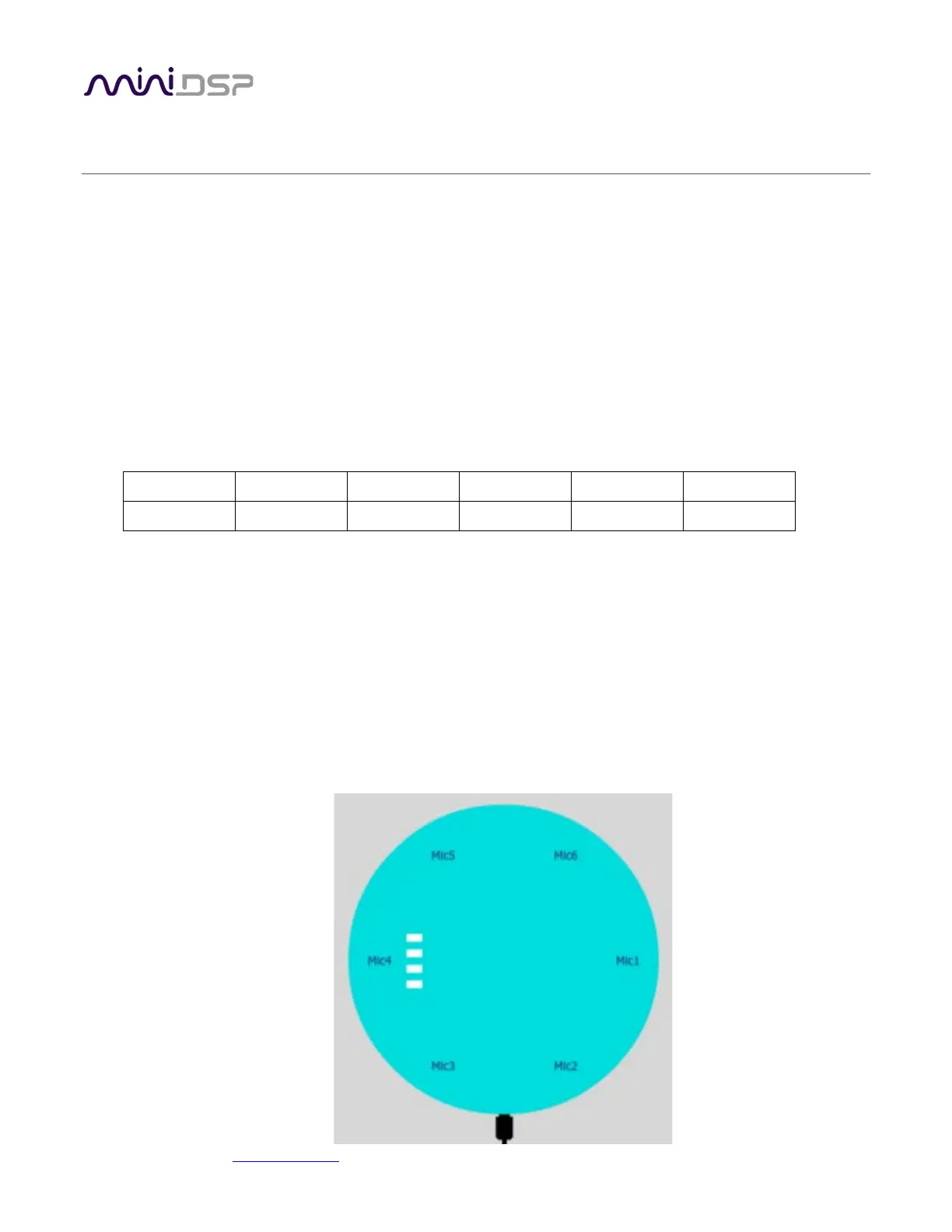
Dir = Direction of Arrival, represented by a number correspond to mic position. Can range from 1 ~ 6 for Mic1~6
as per below diagram. .
Angle = angle of the direction number as specified by Dir, in degrees. Range from 0 ~ 360
Angle.HB = high byte of the angle
Angle.LB = low byte of the angle
The mic position, labelled by the mic number is shown in the figure below:
SW1
SW2
SW3
SW4


 To Next Page