EasyManua.ls Logo

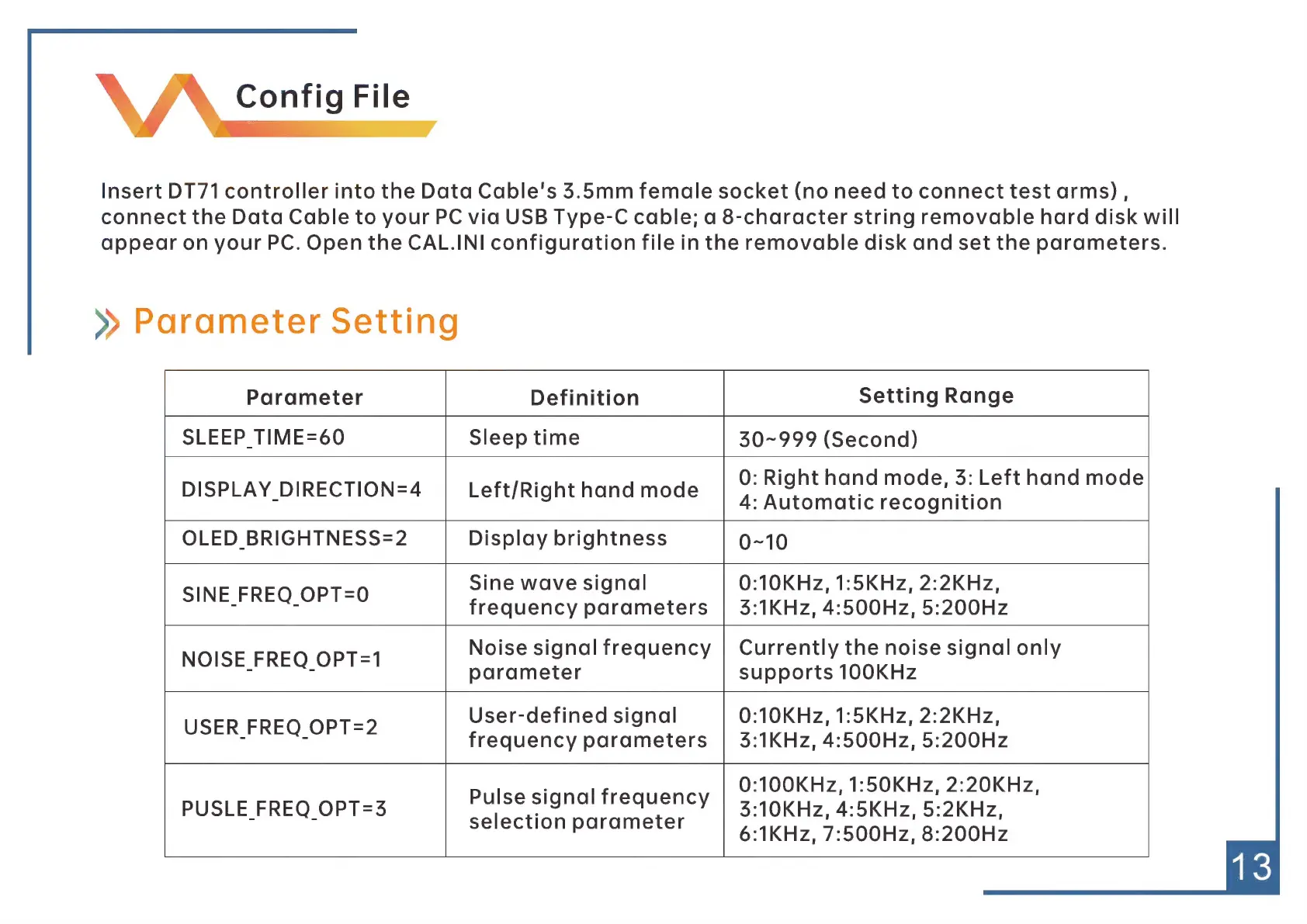
MINIWARE DT71 - Config File; Parameter Setting

Default Icon
18 pages
Print Icon
To Next Page IconTo Next Page
To Previous Page IconTo Previous Page
Loading...
\
A
Config
File
Insert
DT71
controller
into
the
Data
Cable's
5.5mm
female
socket
(no
need
to
connect
test
arms),
connect
the
Data
Cable
to
your
PC
via
USB
Type-C
cable;
a
8-character
string
removable
hard
disk
will
appear
on
your
PC.
Open
the
CAL.INI
configuration
file
in
the
removable
disk
and
set
the
parameters.
»
Parameter
Setting
Parameter
Definition
Setting
Range
SLEEP
TIME=60
Sleep
time
50-999
(Second)
DISPLAY
DIRECTION=4
|
Left/Righthandmode
|
©:Righthand
mode,
5:
Lefthand
mode
4:
Automatic
recognition
OLED
BRIGHTNESS=2
Display
brightness
0-10
_
Sine
wave
signal
0:10KHz,
1:5KHz,
2:2KHz,
rn
frequency
parameters
|
5:1KHz,
4:500Hz,
5:200Hz
NOISE
FREQ
OPT=1
Noise
signal
frequency
|
Currently
the
noise
signal
only
7
n
parameter
supports
100KHz
USER
FREQ
OPT=2
User-defined
signal
0:10KHz,
1:5KHz,
2:2KHz,
frequency
parameters
|
35:1KHz,
4:500Hz,
5:200Hz
pulse
signal
frequency
|
©:100KHz,
1:50KHz,
2:20KHz,
PUSLE
FREQ
OPT=3
9
AUSREY
|
3:10KHz,
4:5KHZz,
5:2KHz,
selection
parameter
|
61kHz,
7:500Hz,
8:200Hz