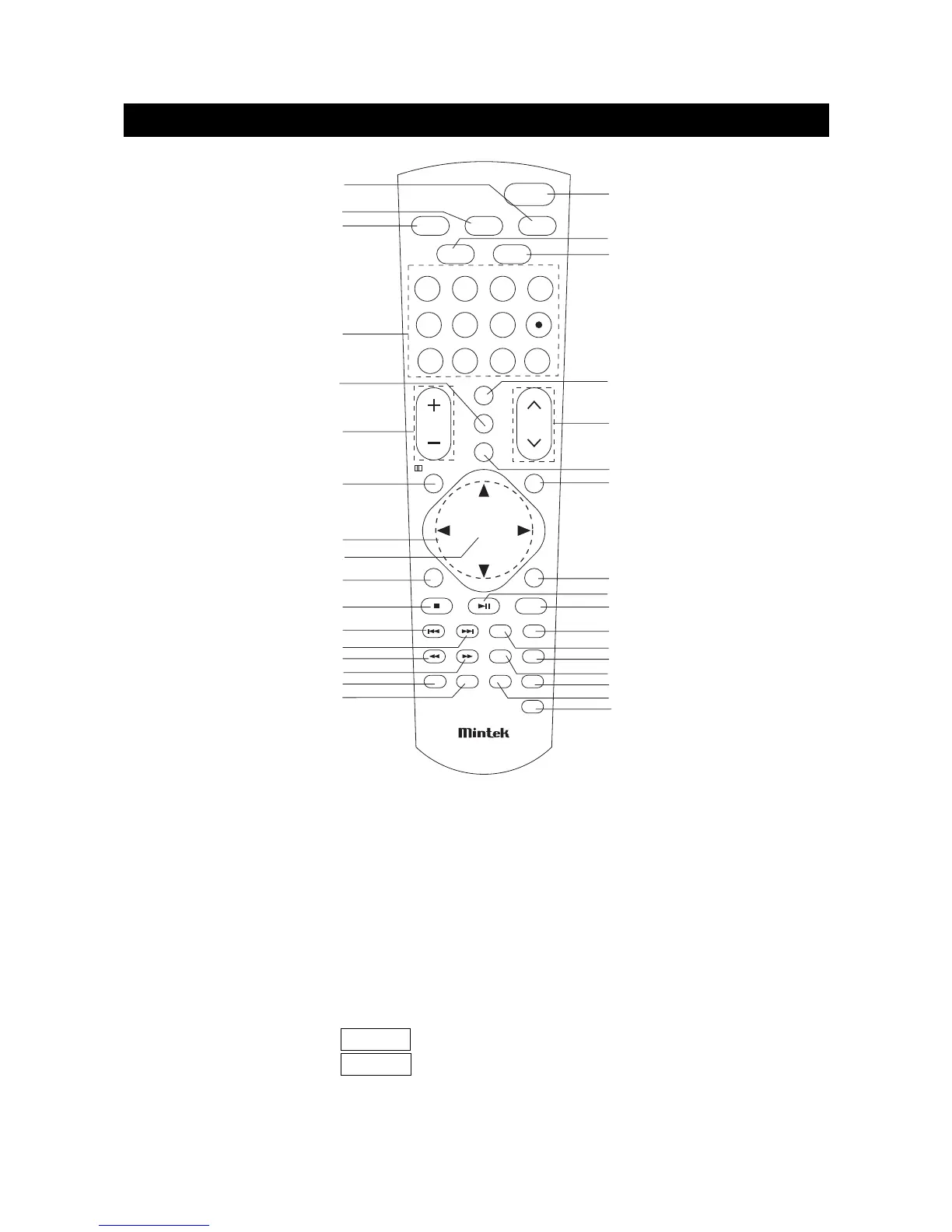
1) VIDEO: Use to select the input signal source among: Digital TV, Analog TV, Composite ,
S-Video, Component, DVD, HDMI and DVI.
2) DVD/CARD: In DVD mode, use to shift between DVD and CARD. In other mode,
press to change to DVD mode directly.
3) TV: Press to change to TV mode directly.
4) Number Buttons: Use to set the channel numbers.
Dot Button: In Digital TV mode, there can be several TV programs in a channel, use the
number buttons and the dot button to enter. Example: press the number button 5,
the dot button, and then the number button 2 to enter the TV program 5-2.
FAVORITE: Use to select between Favorite Mode On and Favorite Mode Off .
Favorite Mode On: press CH ∧/∨ to select your favorite channel in favorite channel list.
Favorite Mode Off: press CH ∧/∨ to select the all channel searched.
Note: Only in TV mode, Favorite button is available.
REMOTE CONTROL
page8


 To Next Page