EasyManua.ls Logo

Mintek DTV-323-D - SIMPLE BUTTON OPERATION FOR CHANGING VOLUME;SOUND; Using MUTE on the remote control

Mintek DTV-323-D
54 pages
Print Icon
To Next Page IconTo Next Page
To Previous Page IconTo Previous Page
Loading...
Changing the volume
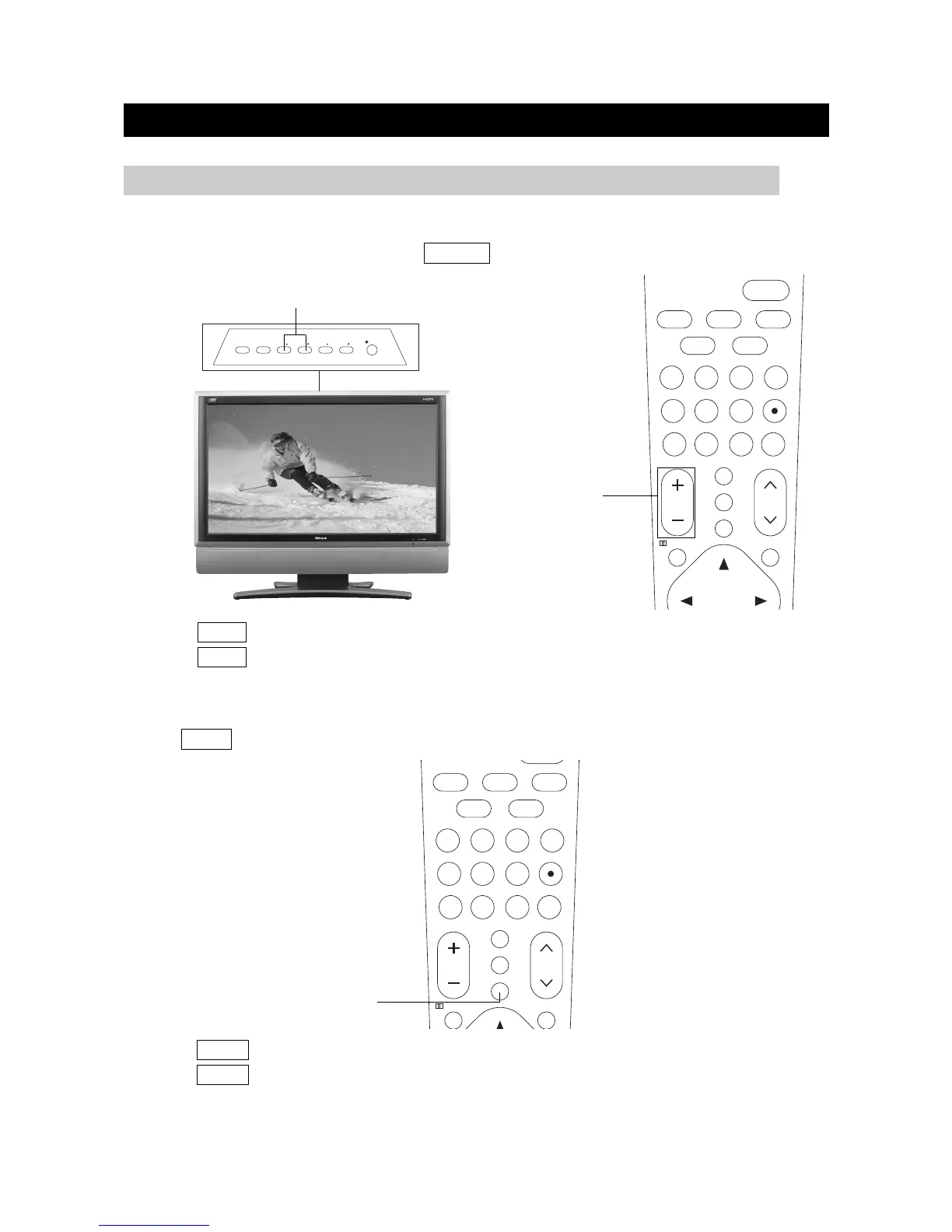
You can change the volume by pressing VOL +/- button.
Using MUTE on the remote control
Press MUTE to mute the current sound output.
WATCHING TV
page15
1. Press MUTE to remove the sound.
2. Press MUTE again to cancel the mute.
1. Press VOL+ to increase the volume.
2. Press VOL- to decrease the volume.
SIMPLE BUTTON OPERATION FOR CHANGING VOLUME/SOUND
VOL+/-

OK
56
78
123
4
9
+10
FAVORITE
VOL CH
POWER
MUTE
10
0
/
TV
VIDEO
S.MODEP.MODE
CC
FLASHBACK
TV MENU
MTS/SAP
DVD/
USB/CARD
MUTE
56
78
123
4
9
+10
FAVORITE
VOL CH
MUTE
10
0
/
TV
VIDEO
S.MODEP.MODE
CC
FLASHBACK
TV MENU
MTS/SAP
DVD/
USB/CARD
SOURCE
ON/OFF
MENU
CH CHVOLVOL
VOL+/-

Related product manuals