4. Brush Pressure Settings
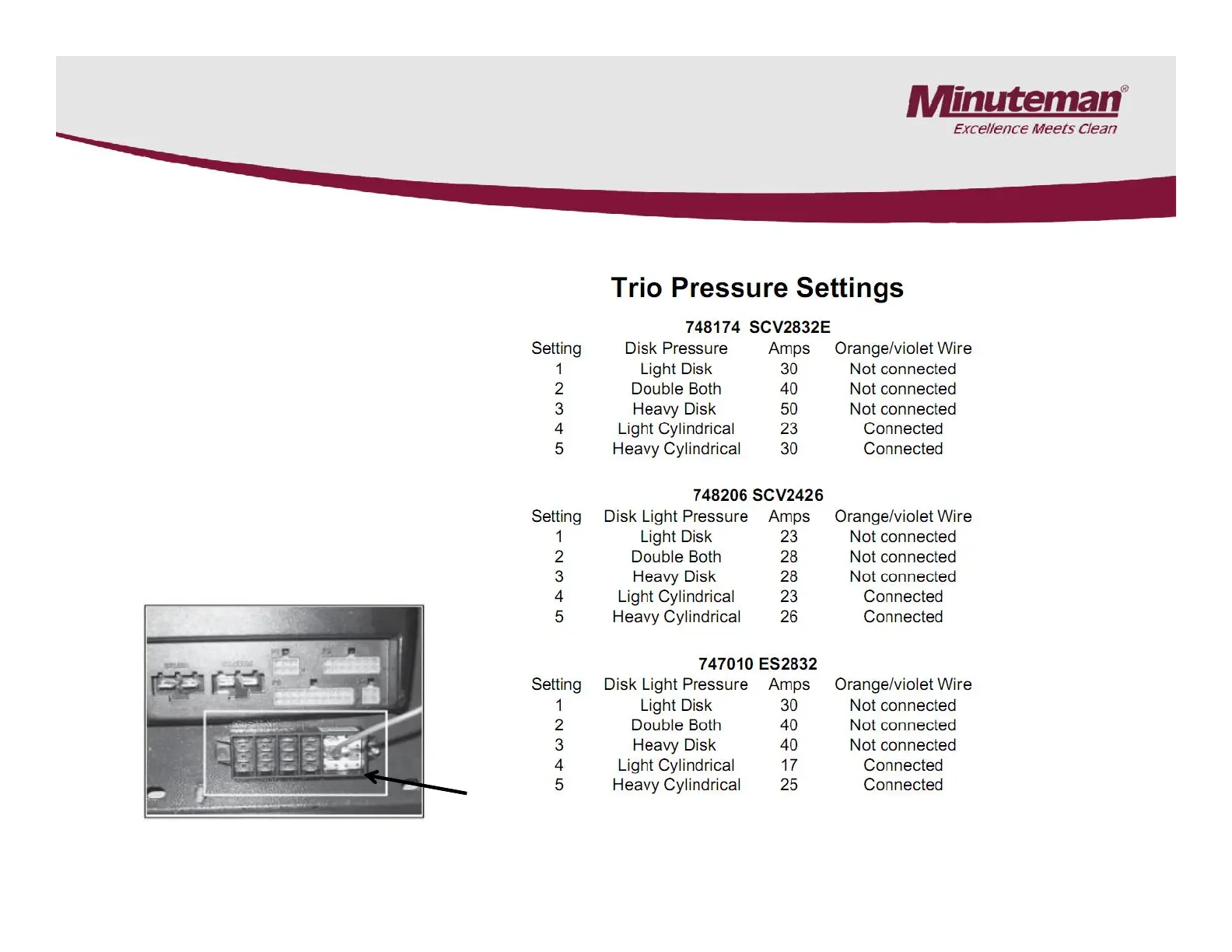
The brush pressure range can be
changed when changing the type of
deck on the SC2832E, SC2426P,
CP2832 and ES2832 models.
Connect the orange/violet wire into
the terminal block with red/black wire
group for cylindrical decks and
unplug it for the disk decks.
The terminal block is located below
the Trio controller on the SCVs and
below the control panel on the ES
The brush pressure range can be
changed when changing the type of
deck on the SC2832E, SC2426P,
CP2832 and ES2832 models.
Connect the orange/violet wire into
the terminal block with red/black wire
group for cylindrical decks and
unplug it for the disk decks.
The terminal block is located below
the Trio controller on the SCVs and
below the control panel on the ES
SCV 2832E Shown
Trio Controller
Page 13


 To Next Page