3
en
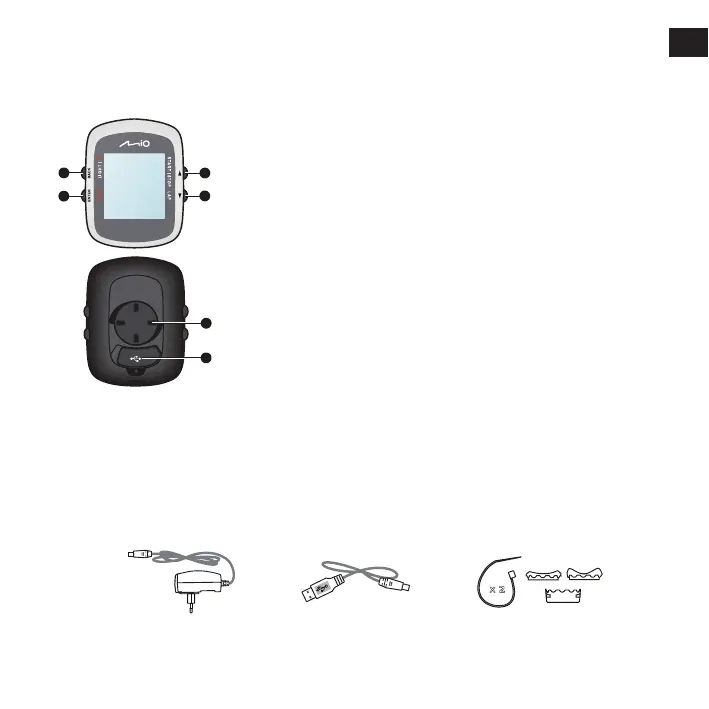
Knowing your device
1. POWER / LIGHT / BACK
• Press and hold for 2 seconds to turn your device on/off.
• When the device is turned on and in DASHBOARD menu, press to
switch the backlight on/off.
• While navigating through the menus(except DASHBOARD), press to
return to the previous screen.
2. MENU / ENTER
• In DASHBOARD menu, press to switch between the screens.
Press and hold for 2 seconds to return to the Main menu.
• While in the menu screen/option list, press to select the desired
function/option.
3. UP / START|STOP
• Press to scroll up in the menu screen/option list.
• In DASHBOARD menu, press to select CONTINUE, PAUSE, or STOP
the timer in training.
4. DOWN / LAP
• Press to scroll down in the menu screen or in the option list.
• In DASHBOARD menu, press to create a lap while the timer is
counting for training.
5. Bike mount socket: for the device mount.
6. Mini-USB connector: connects to the charger or USB cable.
1
2
3
4
5
6
Accessories
Your device comes with the following accessories. To use your device on a bike, ensure you use the
specific bike mount kit that came with your device. Mio may provide optional accessories for specific
models. Please visit Mio website (www.mio.com) for information.
Note: Depending on the specific model purchased, the colour and look of your device and accessories may
not exactly match the graphics shown in this document.
Bike mount kit
Power adapter USB cable
x
2



 To Next Page