4
en
Getting started
Charging the battery
Your device has an internal battery that may not be fully charged when you purchase it. You should
charge the battery for at least 3.5 hours before you start using it for the very first time.
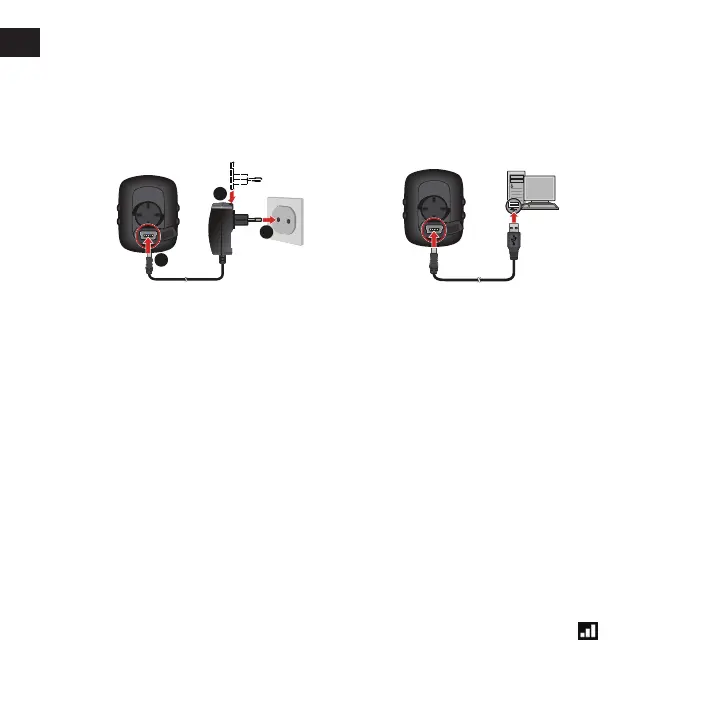
To charge the battery:
• Via the computer
Connect your device to the computer by
using the provided USB cable.
For more information, see the "Connecting
your device to the computer" section.
• Using a mains power socket
Plug the home charger cable into the USB
connector on the back of your device and the
mains power charger into the power socket.
2
1
3
Performing the initial start-up
1. Instructions on how to mount the device and accessories on to a bike can be found at the start of
this guide.
2. Press and hold POWER for 2 seconds to turn your device on.
3. Follow the prompts to personalise your device, including:
• select your preferred language
• select the coordination format: degree or degree/minute/second
• select the units format: imperial or metric
• set up date and time format, including the correct time zone and daylight saving function
• set up your profile, including gender, birthday, weight, height, and workout level
• select your bike type (race, city, or mountain) and complete the bike's data (weight and
wheel size)
Tip: You will only have to do this the first time you use the device. You can change these settings from
the SETTINGS menu while using the device.
4. Once your device is turned on, it will search for satellite signals automatically. This may take
several seconds depending on the location. When GPS is fixed, the GPS signal icon ( ) on the
screen indicates the GPS status.



 To Next Page