5
en
Main menu
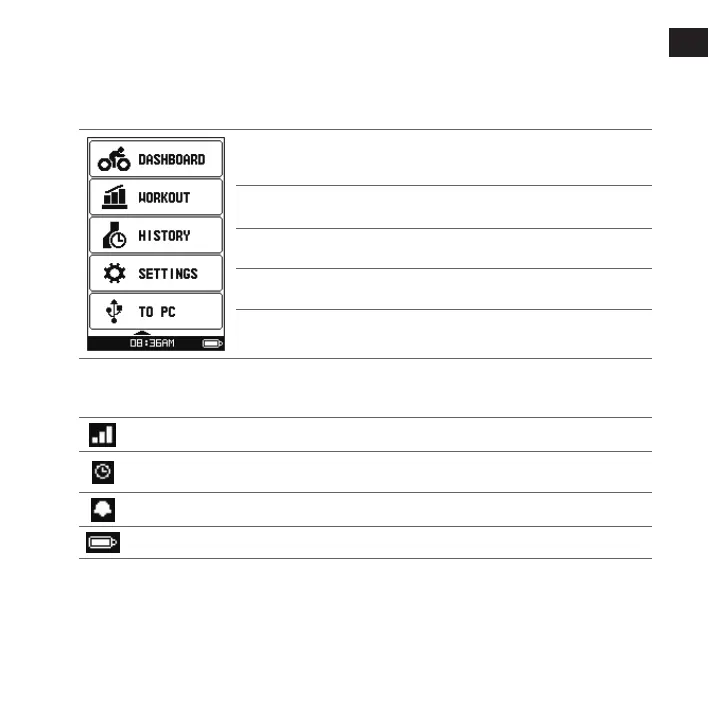
The Main menu is your starting place for various tasks, providing quick access to applications and
settings. Use the UP/DOWN button to select the desired function and then press ENTER.
The DASHBOARD menu displays the view of various functions, including
the date and time screen, compass and navigation screen, and the workout
screens (when a workout has been selected).
The WORKOUT menu lets you set workouts by entering your conditions,
such as the distance, speed, or pace.
The HISTORY menu allows you to check the history data such as date/time,
distance, speed, altitude, etc.
The SETTINGS menu provides various options to enhance your cycling
experience. You can customise the system settings, user profiles and more.
The TO PC menu allows you to transfer your training data from the device to
the computer.
The system icons
The system icons indicating the device's status are displayed at the bottom of the screen.
The GPS signal icon indicates the GPS status.
The Timer icon will display when training is active. When you stop the timer, the icon will be
flashing.
The Alarm icon will display when you set the alarm clock.
The Battery icon indicates the remaining battery power.



 To Next Page