15
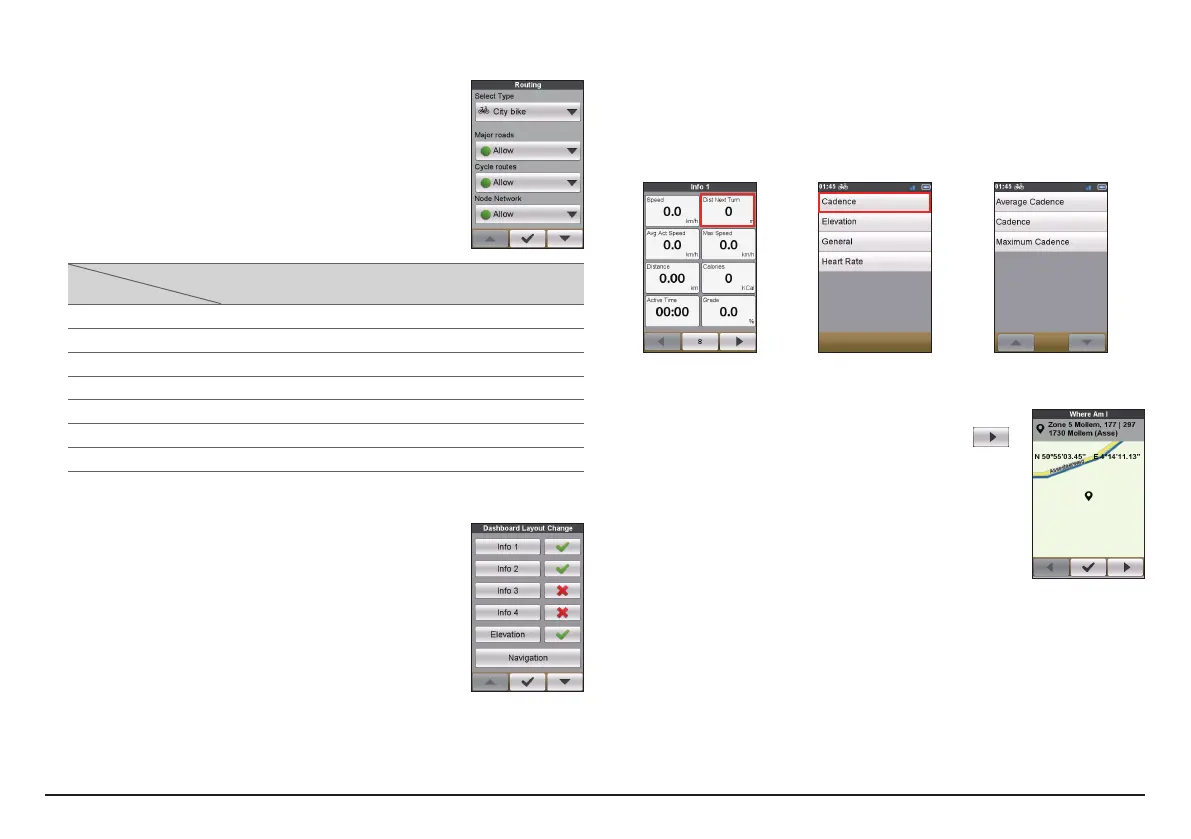
Routing
This setting allows you to set the routing preference by
selecting Prefer, Allow or Try to avoid in each route
option.
The available options may be different depending on the
selected routing type:
Routing type
Options
City bike Mountain
bike
Race bike Run & Walk
Major roads V V V V
Cycle routes V V V
Node network V V V
Unpaved roads V V V
Cobblestone V V V V
Ferries V V V
Walking routes V
Dashboard
In the Dashboard Layout Change screen, you can change the
layout of the following screens:
• Information screen 1, 2, 3 & 4
• Elevation screen
• Navigation
• Map screen
• History screen
To change the screen layout:
1. Tap the corresponding button in the Dashboard Layout Change screen.
2. Tap the number displayed at the bottom of the screen indicates the data
fields (e.g. speed, distance, time, calories, etc.) included in the target screen.
3. Tap the numeric button and then select from the available number of data
fields to display.
4. You can also change what data fields are displayed by tapping on each
individual data field and then select the desired option in the list.
Where Am I
The Where AM I screen displays your current GPS position
with the cooridnates info in map view. When tapping
,
you can see the number of satellites, your current position,
and the strength of the signals.


 To Next Page