8
No. Icon Description
❷
User profile
/ / : Bike (city bike/mountain bike/race
bike) navigation mode enabled.
: Running navigation mode enabled.
❸
Recording status
: The device is recording your trip/training.
: Recording has been paused.
❹
GPS signal The GPS signal icon indicates the GPS status.
A bar shows the strength of the GPS signal being received;
the more bars the stronger the signal.
❺
Battery status The Battery icon indicates the remaining battery power.
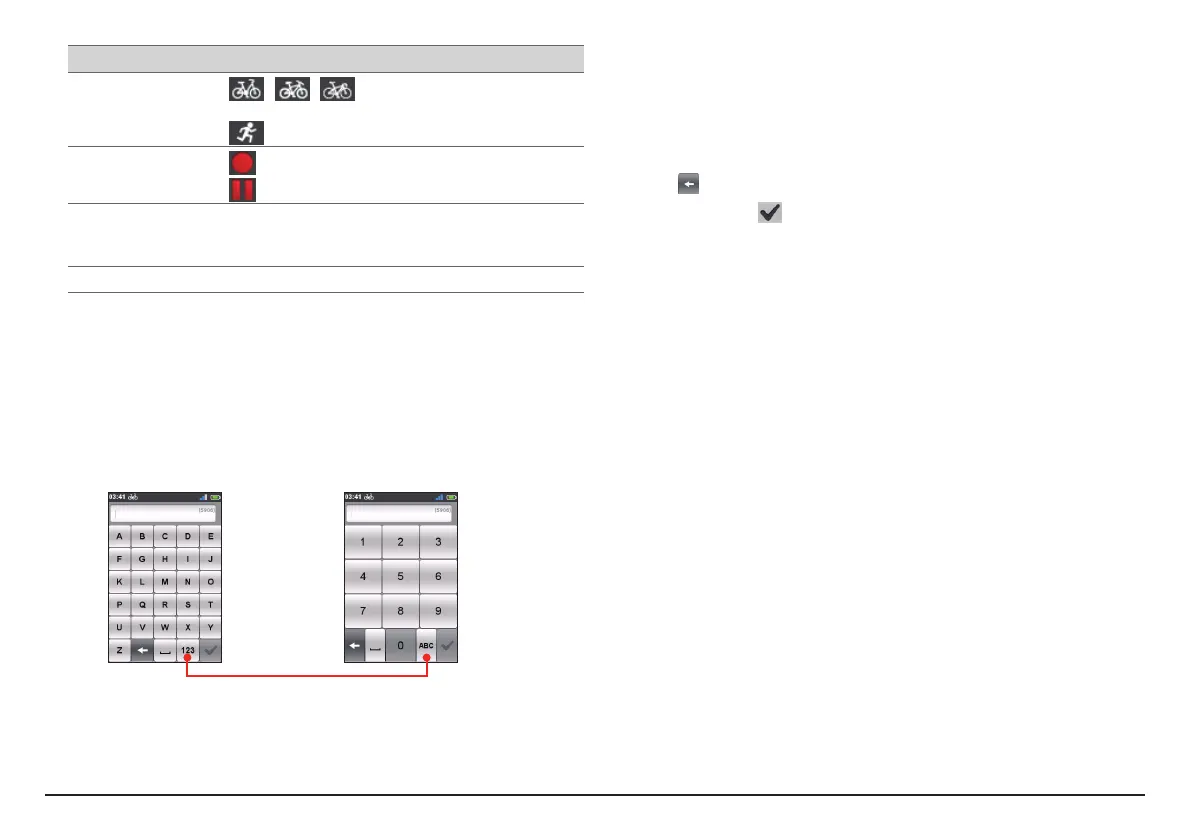
Keyboard screen
The Keyboard screen will display when you are required to enter text, such
as when searching for a street name. Search results will be listed in matching
order, with the closest matches appearing on the screen. The Keyboard screen
can display with various layouts depending on the information you need to
enter.
Example: entering the street name while searching for an address
Numeric keypadABC keyboard
Tap to switch between the ABC keyboard and Numeric keypad.
How do I enter characters/numbers?
• Tap the keys to enter letters or numbers.
The keyboard features the “Predictive text” technology that allows
addresses to be searched easily and quickly. As you enter a letter of an
address, your device will compare all possible combinations against the
maps.
• Tap
to delete the character.
• When done, tap
.
Changing the keyboard layout
The device supports Russian, Bulgarian, and Greek keyboard for local users.
You can enable (or disable) the desired keyboard from Main menu > Settings >
System > Keyboard.


 To Next Page