6
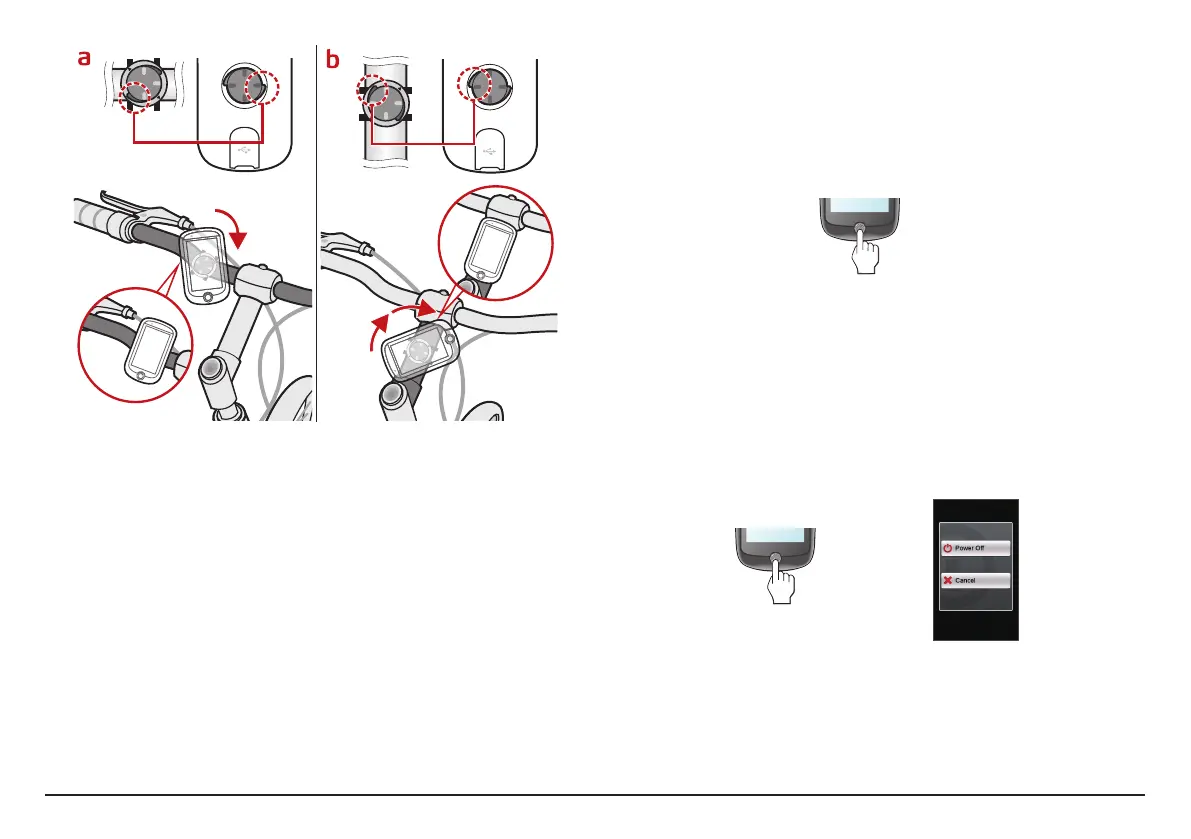
3. To remove the device from the bike mount, rotate it counter-clockwise.
Operating basics
Using the POWER button
• Turning on the device
Press and hold the POWER button for 3 seconds to turn on your device.
3 SEC
• Turning off the backlight
You can set the device to turn off the backlight automatically to reduce
the battery consumption: Main menu > Settings > System > Screen >
Backlight Timer.
Resume using the device to
turn on the backlight.
• Turning off the device
Press and hold the POWER button for 3 seconds to pop up the Power Off/
Cancel screen. Choose Power Off to turn off the device or Cancel to
continue operating the device.
3 SEC
Note: Press and hold the POWER button for 5 seconds to power off the device if it is
not responding.
Your device will automatically turn off after 10 minutes (by default) of
inactivity.
The Power Off/Cancel screen
will pop up and the device will be
turned off if you do not make a selection.


 To Next Page