9
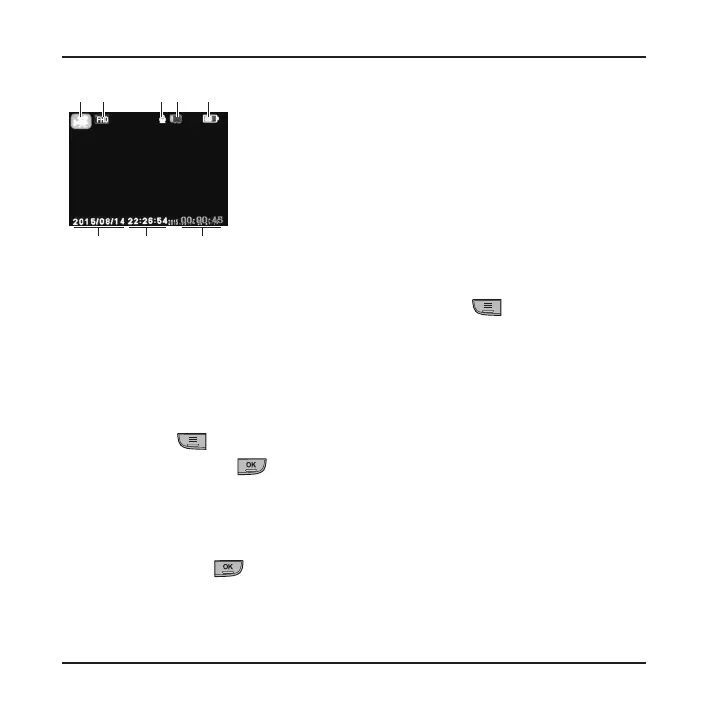
❶ ❷ ❹ ❺
❻
❸
❼❽
❶
Current operation mode
❺
Battery power status
❷
Image resolution
❻
Elapsed time of
recording; remaining
time for recording
❸
Microphone status
❼
Current time
❹
Memory card status
❽
Current date
Note: If continuous recording is ongoing but there is not enough space on your memory card, new
video clips will replace the old ones.
Note: When not recording, you can open the Video menu by pressing
.
Event recording
By default, if an event happens, such as sudden impact, high-speed driving, an
overdone turn or an accidental crash, the G sensor will prompt the recorder to start
an "emergency" recording (an event recording).
If you want to manually start an event recording while continuous recording is in
progress, press
.
To stop recording, press
.
Note: Your MiVue will automatically protect/lock event recordings.
Capture mode
When not recording, press the Power key briey and repeatedly to switch to
capture mode. Press to capture a photo.











 To Next Page