5
Name Description
⓭
Menu key
Opens the settings menu when not recording.
Returns to the previous screen.
Changes the speed (1X, 2X, 4X, 8X) during video
playback.
⓮
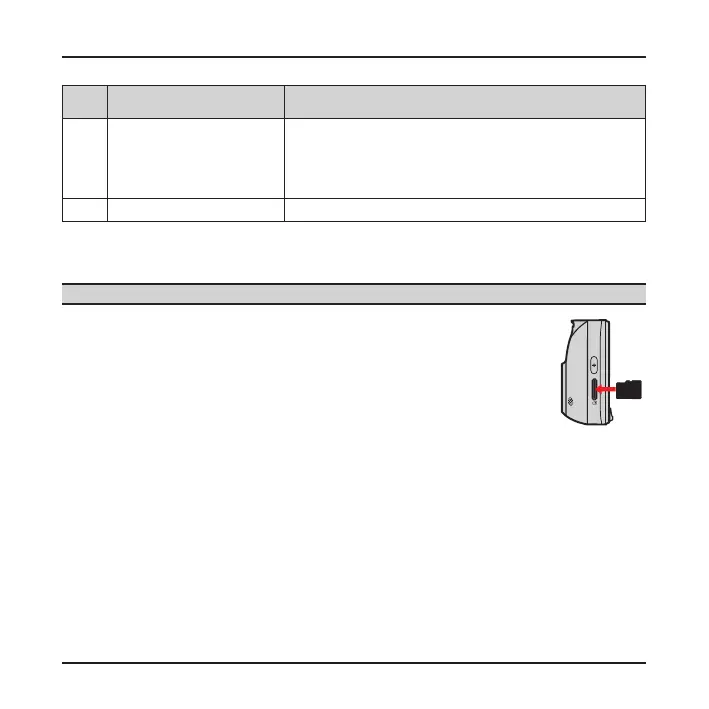
Memory card slot Data is recorded to a MicroSD card.
Inserting a memory card
CAUTION: Do not apply pressure to the centre of the memory card.
You have to insert a memory card before you can start
recording. Your device supports Class 10 memory cards with up
to 32 GB capacity.
Hold the card (MicroSD) by the edges and gently insert it into
the slot as shown in the illustration.
To remove a card, gently push the top edge of the card inwards
to release it, and pull it out of the slot.
Note: Before you start recording, please format the MicroSD card to avoid malfunction caused by
les not created by MiVue. You can format the card on your computer or on MiVue.
Note: MiTAC does not guarantee the product’s compatibility with MicroSD cards from all
manufacturers.











 To Next Page