Mio SLICE User Guide 6
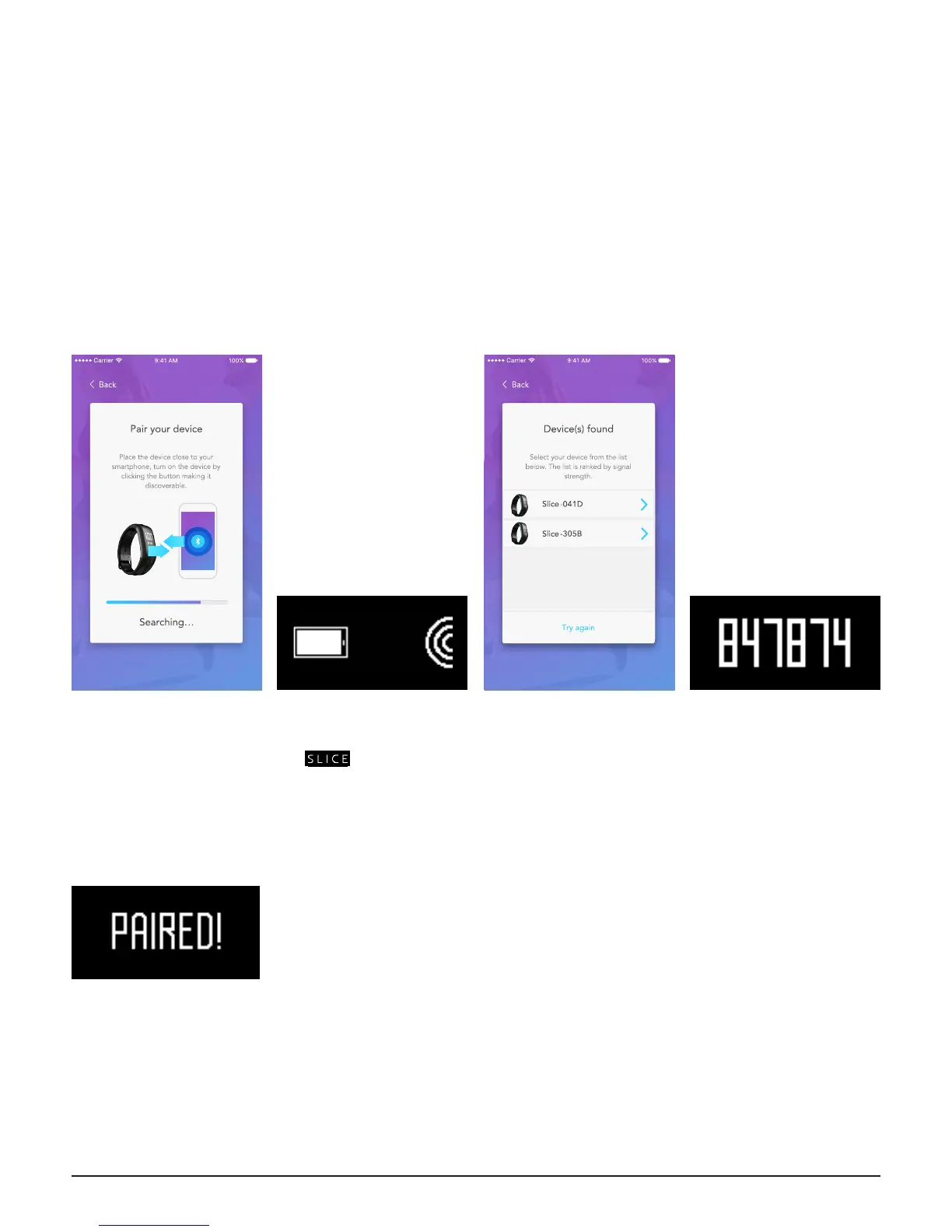
PAIRING MIO SLICE TO YOUR SMARTPHONE
CODE VERIFICATION
1. The app will start
searching for Bluetooth
discoverable devices. Be
sure to keep Mio SLICE as
close as possible to your
phone.
3. In the app, select the
SLICE that appears in the
list. If multiple devices
appear, bring your SLICE
as close as possible to
your phone. Refresh the
list, then select the one at
the top of the list.
4. SLICE will display a
6-digit code. Enter this
code in the app when
prompted.
2. Press the button on
SLICE. After it displays
the logo, it will
enter pairing mode for 60
seconds.
5. Your SLICE is now
paired to your phone
and will reconnect
automatically when it is
within range. Your SLICE
cannot be connected to
another phone.
SET UP
Open the Mio PAI app on your smartphone and follow the prompts:
1. Create a new account, or sign in if you already have a Mio account
2. Complete your user prole
3. The app will now guide you to pair Mio SLICE to your phone


 To Next Page