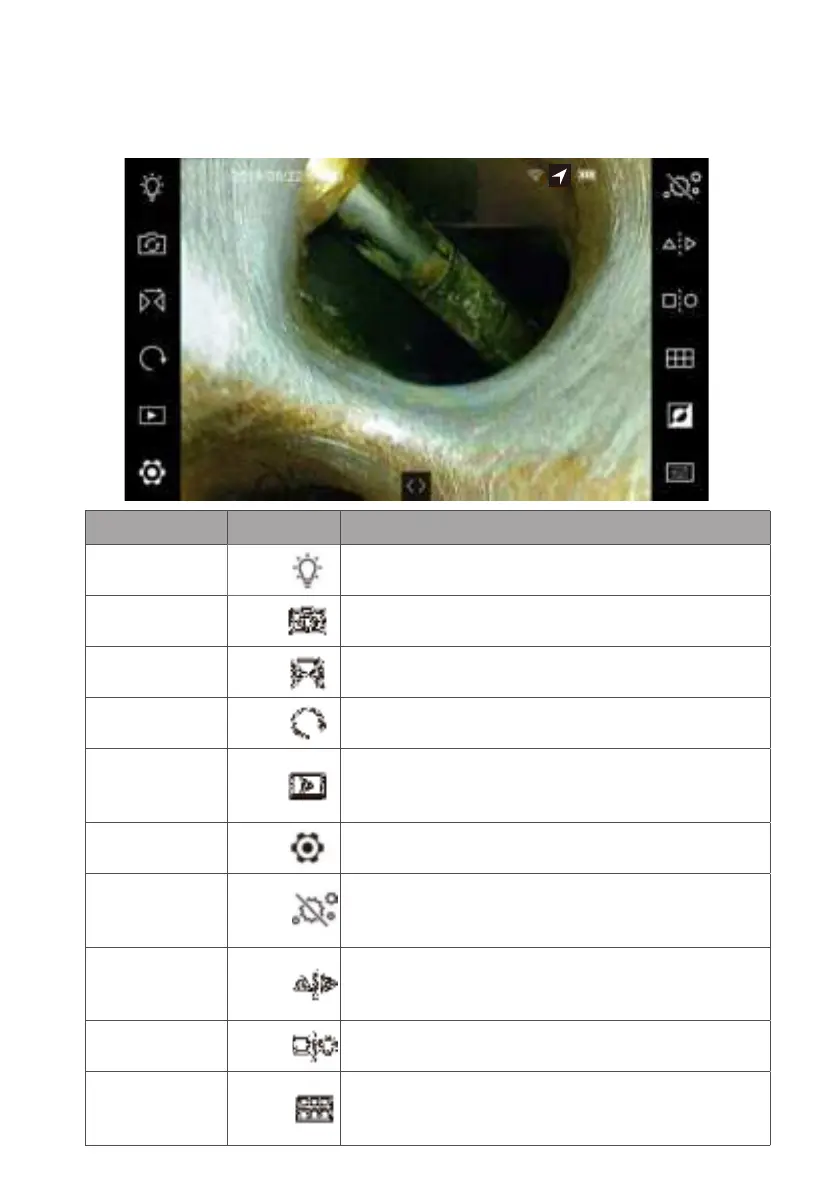
•2.2Functionlist
Function Button Description
Light Control Left-1 Tap to let tip LED back to level-5 default.
Camera switch Left-2
Switch between probe tip camera and back secondary
camera.
Mirror Left-3
Mirror the image horizontally.
Rotate Left-4
Rotate the image 90 degrees clockwise with every click.
Album Left-5
Open the saved images and videos of the corresponding
folder. (More details in section-2.5 to 2.7).
Setting Left-6
Setting menu. When enable Wi-Fi function, this turns
to a signal icon. (Refers to section 3.2)
Particle Free Right-1
Assemble the side-view mirror and enable it to get
rid of particles on the image (system auto zooms to
1.1x to get optimized view area).
Dual View
(*1)
Right-2
Assemble the dual-view mirror and enable it. The monitor
will provide F (front) an S (side) label on the image
(only for 6.0 mm probe).
Compare Right-3
Compare a chosen image in the SD card with the live
view image.
Grid Right-4
Assemble the contact pin and enable the function to
get a reference 2-dimensional measurement scale
(inch/cm) on the screen.
- 22 -



 To Next Page