Quick Reference Guide – Mitel 6867i Premium
For details on all the available features and options please refer to the 6867i IP Phone User Guide located at
http://mitel.ca/mitel-6867-sip-phone
Line/Screen Name
Indicator
Status Messages
Date and Time
Bottom Softkeys
Left Softkeys
More Softkeys:
Dots indicate the number
of softkey “pages” and its
relative position.
New Call Key:
When a line is not in use, a New Call key is available allowing you to dial out using the selected line.
Line Usage Indicators:
Indicates the number of
connected calls on the re-
spective line or if the line
is in a incoming/outgoing
ringing state.
Incoming Call
Outgoing Call
Available Lines:
Displays a list of the
on the phone. See UI
Navigation for more
details.
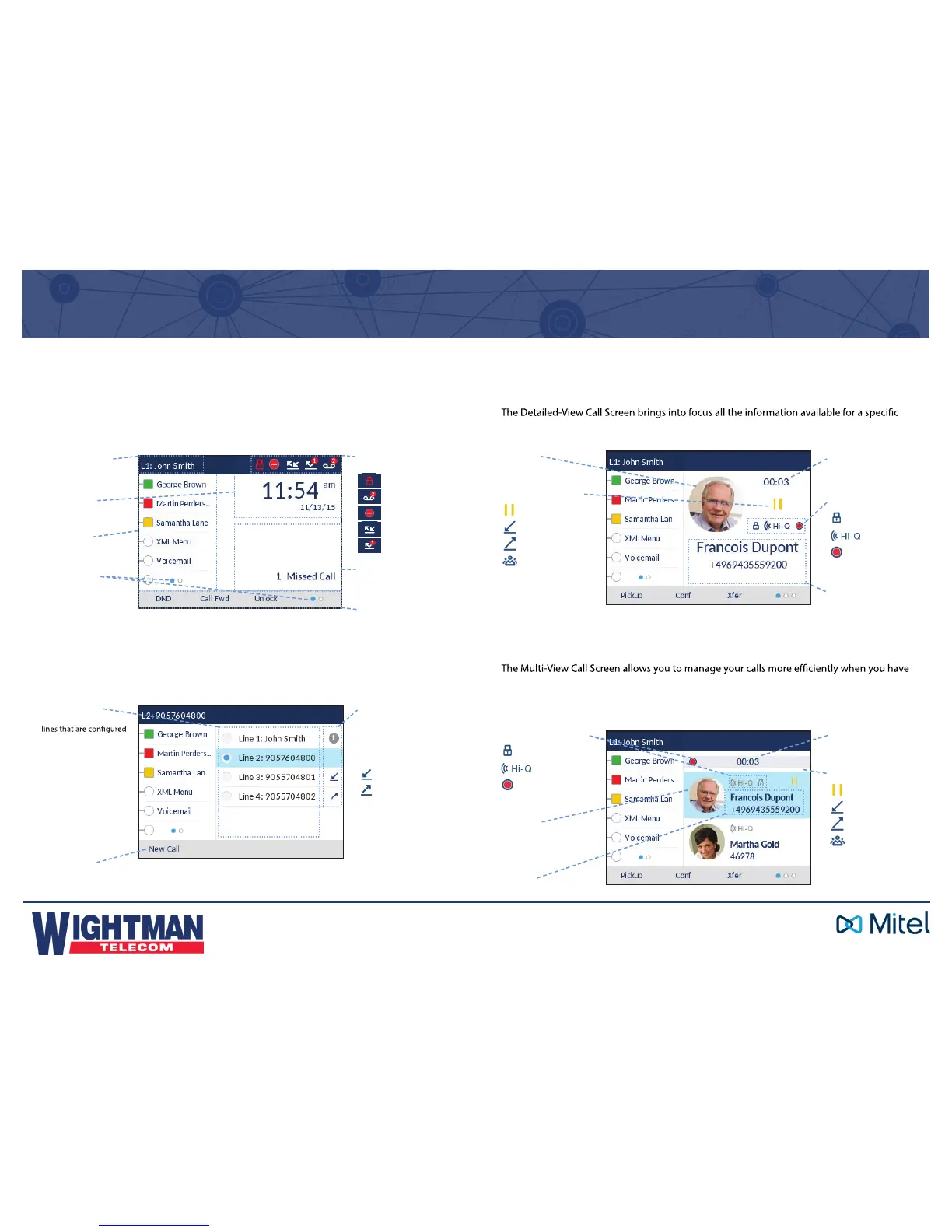
Line Selection Screen
The Line Selection Screen allows you to easily view the lines in use and select a line to
act upon.
Home Screen
The Home Screen displays the date and time along with various important status
messages. It is the default screen displayed when the phone is in an idle state.
Phone/Line Status
Indicators:
Phone Locked
Voicemail
Do Not Disturb
Call Forward
Missed Calls
Call Status Indicators:
On Hold
Incoming Call
Outgoing Call
Conference Call
Call Timer
Picture ID
Caller ID
Call Feature Indicators:
TLS/SRTP
Encryption
Mitel Hi-Q
TM
Active VoIP
Recording
Detailed-View Call Screen
call. It is the default screen displayed for all active point-to-point calls.
Multi-View Call Screen
more than one call in progress. It is particularly useful in transfer and conference scenarios.
All pertinent information from the Detailed-View Call Screen is also available on the Multi-
View Call Screen but information for two remote parties can be seen simultaneously.
Picture ID
Caller ID
Call Timer
Note:
No icon indicates that
the call is active.
Call Status Indicators:
On Hold
Incoming Call
Outgoing Call
Conference Call
Note:
No icon indicates that
the call is active.
Call Feature Indicators:
TLS/SRTP
Encryption
Mitel Hi-Q
TM
Active VoIP
Recording
User Interface (UI) Overview



 To Next Page