QUICK REFERENCE GUIDE
User Interface (UI) overview
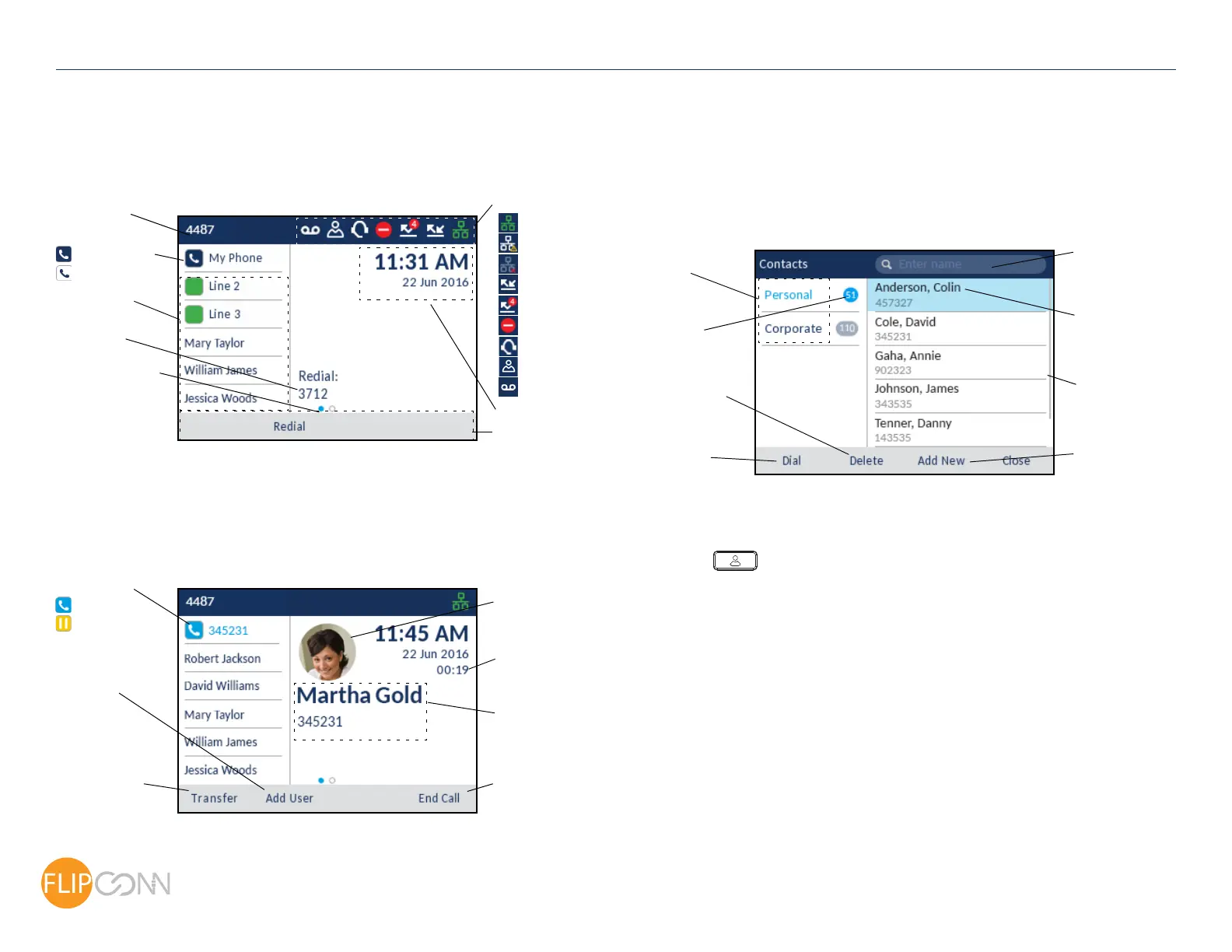
Home screen
The Home screen displays the date and time along with the last dialed number. It is the
default screen displayed when the phone is in an idle state.
Call screen
When on an active call, all the essential information regarding the call is displayed on
screen, including the caller’s avatar, name, number, and call duration timer. The context-
sensitive softkeys also change allowing you access to more call handling features.
Applications
Contacts
The Contacts application is your personal phone book and directory, conveniently stored
within your phone. The Mitel MiVoice 6920 IP Phone supports a localized Personal
directory as well as enhanced functionality allowing for interoperability with LDAP
(corporate) directories.
Making a call using the Contacts application
1. Press the key to access the Contacts application.
2. Navigate to the respective contacts folder and scroll through the contacts by using the
navigation keys
or
Enter characters using the keypad and press the Search softkey to use the search
feature.
3. When the applicable contact is highlighted, press the Select bu
tton or Dial softkey to
place a call using the entry’s default phone number
or
To place a call to a different phone number defined for the entry (for example, a mobile
number), press the Right navigation key, highlight the phone number you want to call
using the Up or Down navigation keys, and press the Select button or Dial
softkey.
Status Indicators
Network Connected
Call Forward Always
Missed Calls
Do Not Disturb
Date and Time
Programmable
State-Sensitive
Programmable Key
Page Indicator
Keys
Last Number
Dialed
Softkeys
Dots indicate
the number of
programmable key
“pages” and its
relative position.
Call Timer
Caller ID
Avatar
Transfer Softkey
Conference
Softkey
End Call Softkey
Prime Line Key
Prime Line Key
Solid - Available
Busy
On Hold
Blinking - Ringing
Attempting Connection
Disconnected
Search Field
Contact Details
(Name and Number)
Add New
Contact Softkey
Contact
Number of
Contacts
Delete Contact
Softkey
Dial Softkey
Folders
in Folder
Your Number
Headset Connected
Hotdesk User
Voicemail Pending
Scrollbar
Copyright 2017, Flip Connect LTD. All Rights Reserved.
Quick User Guide
ECT
Better . Connected
TM



 To Next Page