1. Press the key to access the Contacts application.
2. Navigate to the Mobile contacts folder.
3. Press the Update softkey.
The Mitel MiVoice 6930 IP Phone attempts to re-synchronize and update your mobile
contacts.
Note: If the update fails, a failed to retrieve contacts message displays on screen. Press Retry to
attempt to update again, or Cancel to cancel the attempt.
Answering an incoming mobile call using your Mitel MiVoice 6930
IP Phone
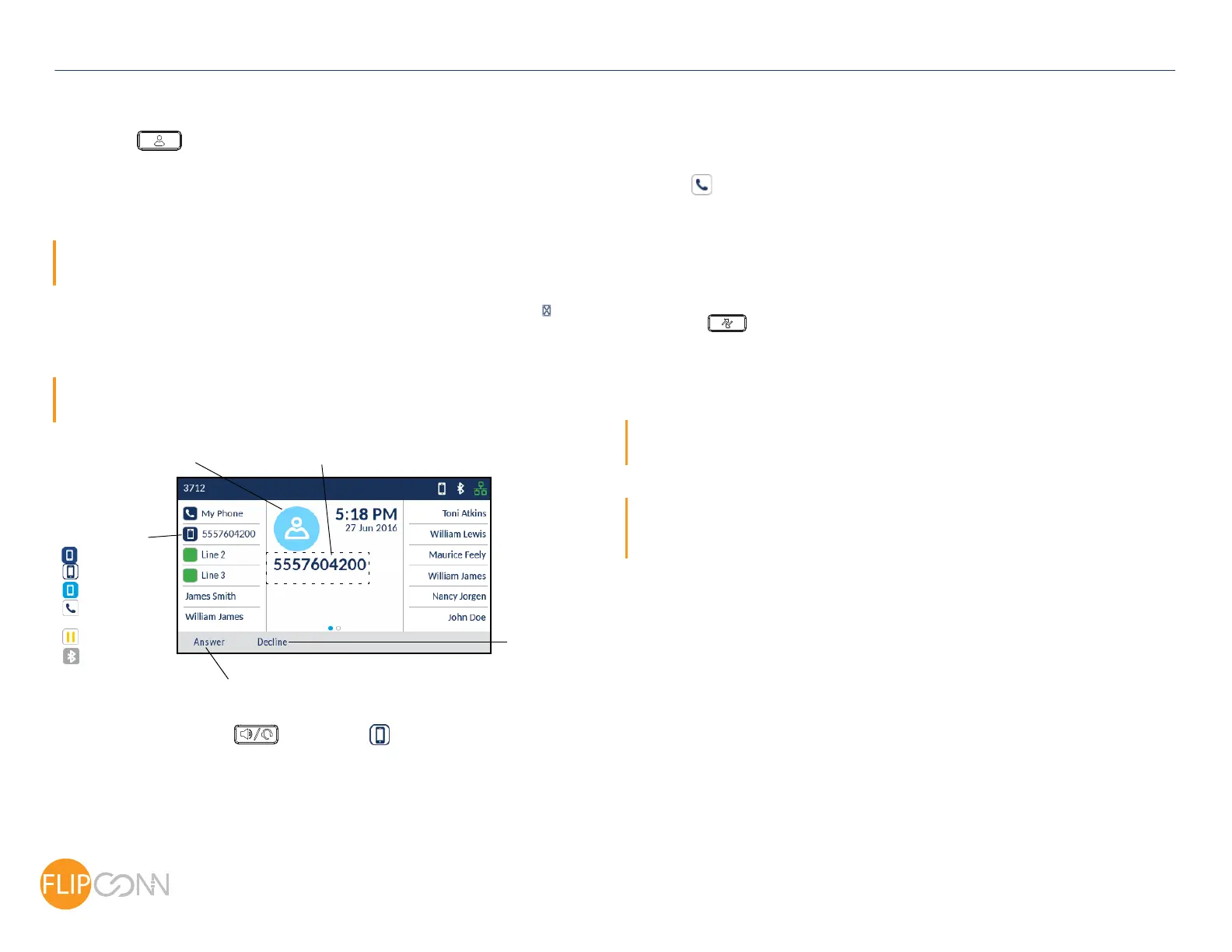
When your mobile phone is paired and connected to your Mitel MiVoice 6930 IP Phone,
incoming calls on your mobile phone will be indicated on your 6930 IP Phone as well.
Not Connected
On Hold
Blinking - Ongoing
Call on Mobile
Busy
Blinking - Ringing
Solid - Idle
Mobile Caller ID
Decline
Softkey
Caller Avatar
Answer Softkey
Mobile Line Key
Note: A Mobile Line key must be configured to answer an incoming mobile call using your Mitel
MiVoice 6930 IP phone. For more information, refer to the Mitel MiVoice 6930 IP Phone User Guide.
Lift the handset or press the key, blinking Bluetooth Line key, or Answer
softkey for handsfree operation.
Moving the audio of an active mobile call between your mobile phone and
Mitel MiVoice 6930 IP Phone
Press the Push call softkey to push the mobile call’s audio from your Mitel MiVoice 6930
IP Phone to your mobile phone
or
Press the
Mobile Line key to pull the mobile call’s audio from your mobile phone to
the Mitel MiVoice 6930 IP Phone.
Syncing mobile call history
The Mitel MiVoice 6930 IP Phone automatically syncs your mobile call history to the Call
History application upon pairing and connection.
To manually update your mobile call history:
1. Press the
(Call History) key.
2. Navigate to the My Mobile or Missed folder.
3. Press the Update softkey.
The Mitel MiVoice 6930 IP Phone attempts to re-synchronize and update your mobile
call history.
Note: If the update fails, a failed to retrieve contacts message displays on screen. Press Retry to
attempt to update again, or Cancel to cancel the attempt.
Note: For other functions, such as viewing mobile call history details, dialing a mobile call history entry,
adding a mobile call history entry to Contacts, and deleting mobile call history, refer to the Mitel MiVoice
6930 IP Phone User Guide.
Copyright 2017, Flip Connect LTD. All Rights Reserved.
Quick User Guide
ECT
Better . Connected
TM



 To Next Page