QUICK REFERENCE GUIDE
Getting started
Contacts
Voicemail
Settings
Provides
services and
options that
allow you to
customize
your phone
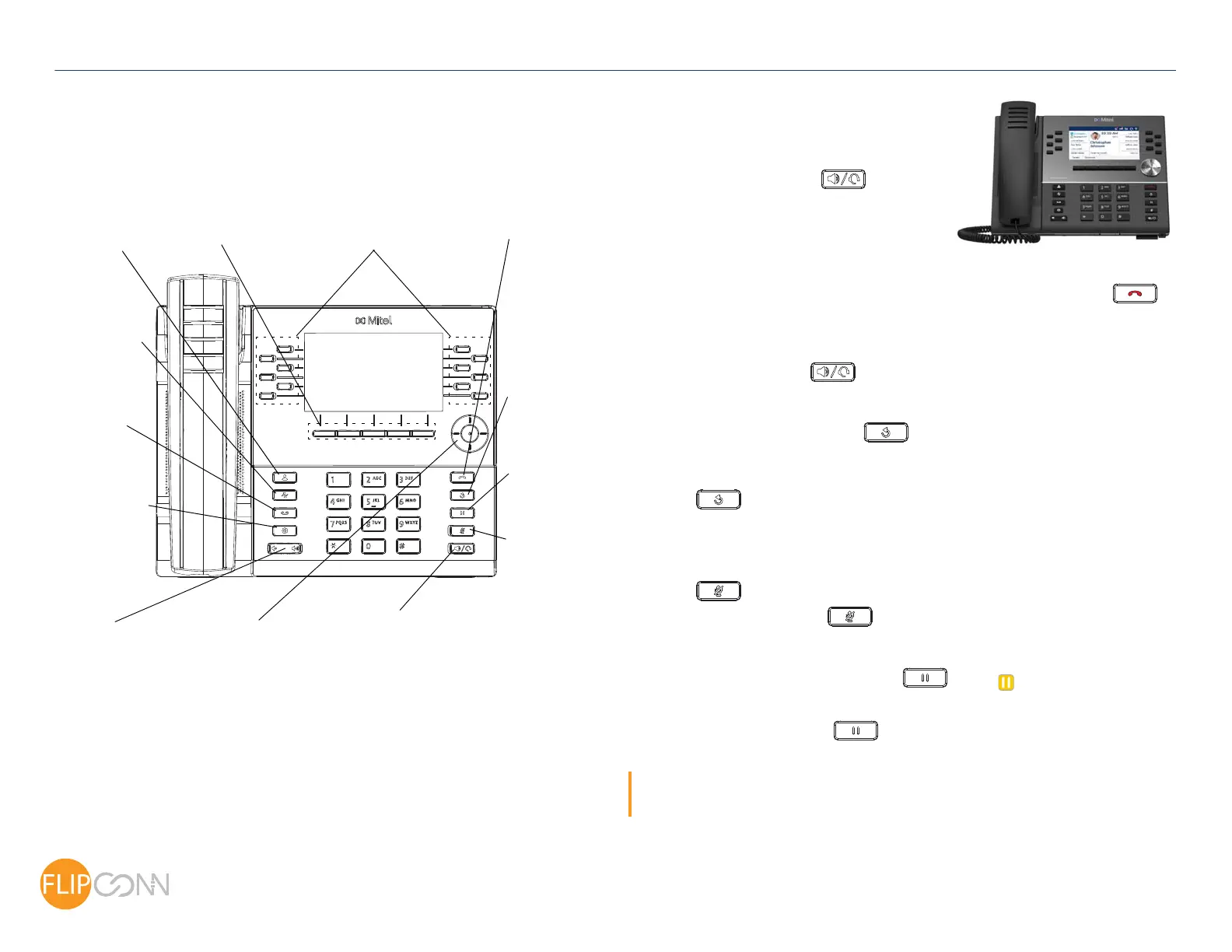
Volume
Speaker/Headset
Toggles the phone’s audio between speaker
and headset. If you are using a DHSG/EHS
headset, ensure that the headset jack adapter is
removed from the headset port. See the Mitel MiVoice
6930 IP Phone Installation Guide for more details
Warning!
The headset port is for headset use only.
Plugging any other devices into this port
may cause damage to the phone and will
void your warranty.
Mute
Navigation/Select
Multi-directional navigation
keys are used to navigate
through phone menu.
Press the center button to
the left and right navigation
keys can be used to access
Programmable Keys
Up to 72 programmable keys,
a maximum of 12 programmable keys
the additional pages of
programmable keys
Redial
Goodbye
Hold
Ends active calls
Mutes/unmutes
Displays Call
Places an active
call on hold or
Displays
a list of your
contacts
Adjusts the
volume of
the ringer,
handset,
speaker,
and headset
Provides
On the
Home screen,
Softkeys
Five state-sensitive
softkeys
service
your voicemail
access to
per page
and used for
exiting menus
Call History
Displays a list of
missed, outgoing
and received
calls as well as
My Mobile and
Missed calls
History with a list
of outgoing calls
all outgoing audio
on headset,
handset or
speaker
resumes a call
from hold
select menu options and
perform various actions
Basic call handling
Making a call
1. Lift the handset or press the key, and
dial the number.
2. Press the Line programmable key and dial
the number.
Ending a call
Place the handset back in its cradle, press the End Call softkey, or press the
key.
Answering a call
Lift the handset or press the key for handsfree operation.
Redialing
Press the Redial softkey once or the key twice to call the last dialed number as
displayed on the Home screen
or
Press the
key once to access the Call History application with a list of recently
dialed numbers. Use the up and down navigation keys to scroll through the entries and
either press the Select button or Dial softkey to redial the selected number.
Muting
Press the key while on an active call to mute the microphone for your handset,
headset, or speaker. Press the
key again to unmute the audio.
Holding and resuming
1. To place an active call on hold, press the key. A (hold) icon flashes on the
respective Line key.
2. To resume the call, press the
key again or press the respective Line key
Note: For details on all the available features and options, refer to the Mitel MiVoice 6930 IP Phone
User Guide.
Copyright 2017, Flip Connect LTD. All Rights Reserved.
Quick User Guide
Mitel MiVoice 6930 IP Phone
ECT
Better . Connected
TM



 To Previous Page