To Next Page
J
John DawsonAug 17, 2025
How to change time and date on Mitel IP Phone?
- CcolleensmithAug 18, 2025
If the date and time are incorrect on your Mitel IP Phone display, contact your system administrator to correct it.



How to change time and date on Mitel IP Phone?
If the date and time are incorrect on your Mitel IP Phone display, contact your system administrator to correct it.
How to correct the name on Mitel IP Phone display?
Display names on Mitel IP Phones are assigned by your system administrator.
How to program System Speed-Dial numbers on Mitel IP Phone?
System Speed Dial numbers on a Mitel IP Phone are programmed by your system administrator.
Why can't I use some features on my Mitel IP Phone?
If you cannot access a feature on your Mitel IP Phone, it might not be enabled. Contact your system administrator for assistance.
What to do if my Mitel IP Phone is not working properly?
If your Mitel IP Phone isn't functioning correctly, contact your system administrator for assistance.
How to fix audio problems (echo, distortion) on Mitel IP Phone?
If you're experiencing audio issues such as echo, distortion, or choppiness on your Mitel IP Phone, contact your system administrator for help.
What to do if Mitel IP Phone shows 'INVALID EXTENSION NUMBER'?
If your Mitel IP Phone displays an 'INVALID EXTENSION NUMBER' error, it means the extension number you entered doesn't exist. Try again using a valid extension number.
What does 'INVALID FEATURE CODE' mean on Mitel IP Phone?
If your Mitel IP Phone displays 'INVALID FEATURE CODE', the feature code you entered does not exist. Retry using the correct feature code.
What does 'CANNOT ACCESS RESERVED FEATURE' mean on Mitel IP Phone?
If you cannot access a reserved feature on your Mitel IP Phone, your system may not support it. Contact your system administrator for more information.
What does 'NO UPDATE PERFORMED' mean on Mitel IP Phone?
If your Mitel IP Phone displays 'NO UPDATE PERFORMED', it means the feature was not completed or one or more feature conditions were not met.
Introduces the Mitel 8568 Telephone and the scope of the guide.
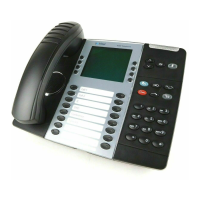
Describes the physical components and features of the 8568 telephone.
Explains the function of various physical buttons on the telephone.
Covers the programming of buttons for quick access to features or speed-dial numbers.
Guides on connecting and using a telephone headset.
Explains how to adjust volume for ringer, handset, headset, and speaker.
Instructions on adjusting the display's contrast setting for better readability.
Lists default feature codes for various telephone functions.
Basic instructions for answering incoming calls using handset or speakerphone.
Provides instructions for dialing emergency numbers like 911 or 999/112.
Instructions for making calls to numbers outside the system.
Covers using System and Station Speed Dial for quick dialing.
Instructions for activating and using the speakerphone mode.
Explains how to place calls on Individual or System Hold.
Steps for transferring a call to another internal extension.
Explains Manual and System Call Forwarding options.
Allows users to log in to shared phones while maintaining identity and settings.
Lists common error messages and their explanations.
Provides general tips and solutions for common telephone problems.
 General
| Programmable Keys | Yes |
|---|---|
| Speakerphone | Yes |
| Headset Support | Yes |
| Type | IP Phone |
| Handsfree | Yes |
| Headset Port | Yes |
| Bluetooth | No |
| Wi-Fi | No |
| USB Port | No |
| Supported Protocols | SIP, MiNET |
| Display | Backlit |
| Ethernet Ports | 1 |
| Ethernet Port | 1 Ethernet port |
| Compatible Systems | Mitel MiVoice Business |
| Power over Ethernet (PoE) | Yes |