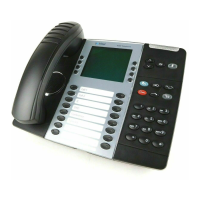
UNUSED BUTTONS
Any button that has not been programmed by our technician can be programmed as a
one-touch station speed dial button, or as a one-touch speed dial to other extensions
(which also serves as a way to see the status of that extension – it will be lit red with the
extension is busy, and flash when it is in Do-Not-Disturb).
TO PROGRAM AN UNUSED BUTTON
With handset in the cradle, press 397
Press the unused button that you would like to program
Station Speed Dial- Dial 382
Enter the speed dial location (0-9)
System Speed Dial- Dial 381
Enter the speed dial location (000-999)
Direct Station Selection- Dial the extension
(Enter the extension number that you want to appear)
Call Logs- Dial 333
(This will give you the ability to see a call history)
Headset Key-317
(This key is not necessary if you have a wireless lifter)
CHANGING YOUR RING TONE
With handset in the cradle, press 398
Press the keys on your keypad (0-9)
Each key will play a different ring tone
Press # to save when you hear a tone you like





 To Next Page