M Mitel (design) is a registered trademark of Mitel Networks Corporation. All other products and services are the trademarks of their respective holders.
© 2017, Mitel Networks Corporation. All rights reserved.
QUICK REFERENCE GUIDE
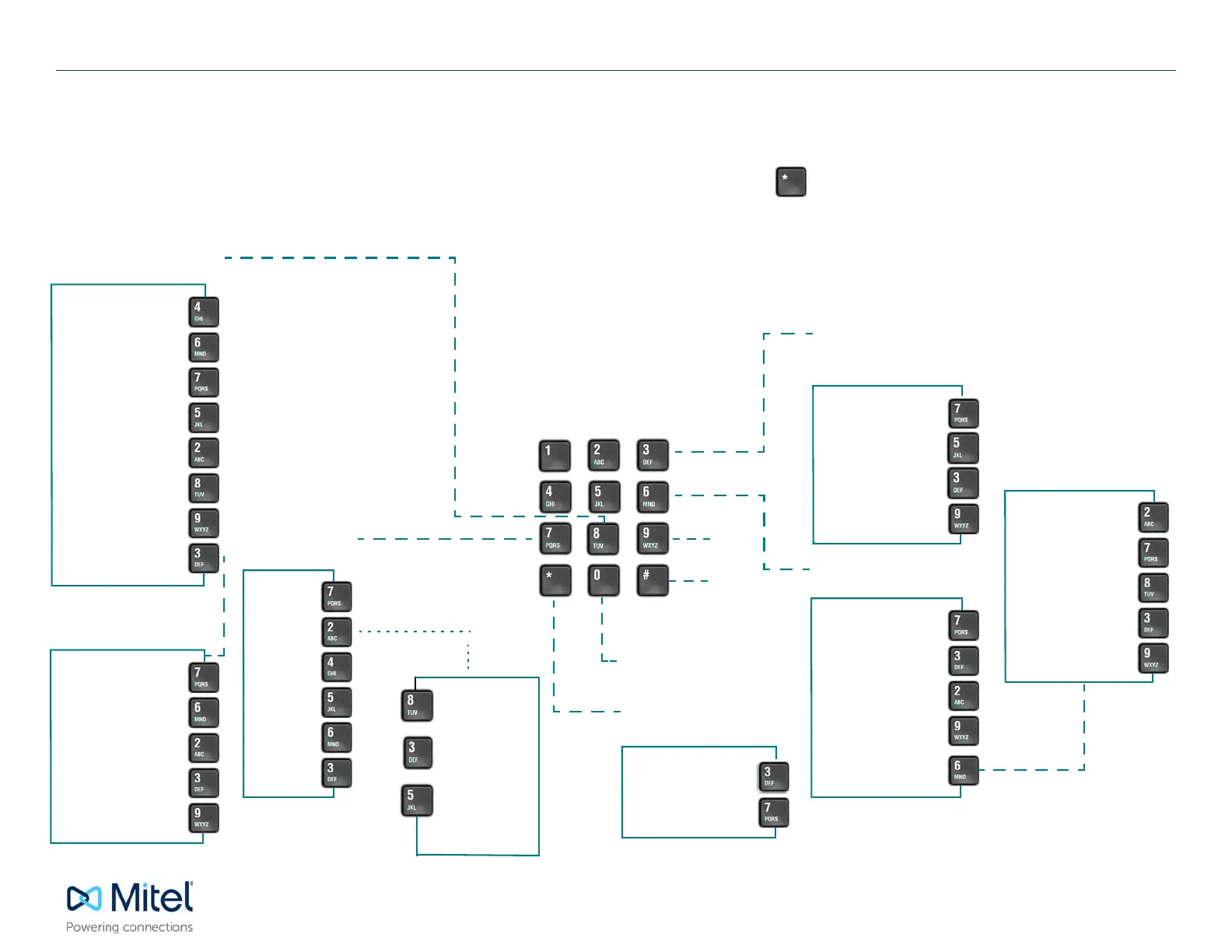
TUI Quick Reference Guide
USER OPTIONS
FAX DELIVERY
PLA
Y VOICE
MESSAGE
Exit
Transfer to
Extension
Transfer to Operator
CALL DIRECTOR
ADMINISTRATION
PLAY E-MAIL
MESSAGE
MAKE MESSAGE
MESSAGE
ADDRESSING
OPTIONS
Change Greeting
Change Name
Change Passcode
Distribution Lists
Call Schedule
Options
Tutorial
Exit to Main Menu
Fax Delivery Options
Retrieve Unplayed
Fax Messages
Personal Fax
Telephone Number
Fax Cover Page
Options
Enable/Disable Auto
Fax Delivery
Exit Options Menu
Play
Answer
Give
Keep
Make
Discard
Enable/Disable
Override
Record Greetings
Message
Play
Keep
Delete
Exit to Main Menu
Review
Discard
Append
Exit to Main Menu
Message
Addressing
Options
Confidential
Receipt request
Urgent
Future delivery
Exit options
ACCESSING YOUR MAILBOX
• Enter the NuPoint Unified Messaging system access number.
• Enter your mailbox number (follo
wed by the
key if accessing your mailbox from outside the company).
• Enter your passcode.
• If you have the Advanced Unified Messaging with Text-to-Speech feature, you c
an listen to either your voice mail
messages or your e-mail messages by accessing the relevant menu, as indicated
below.
NOTE: Call Director and Fax are optional features that may not be available on your voice mail system.
MAIN MENU
Mitel NuPoint Unified Messaging
ANSWER OPTIONS
*Voice Mail
Answer
*Dial-back and
delete message
*Dial-back and
keep messag
e
*Answer and Dial-back
options must be enabled.
For more information about
these options, see the
NuPoint UM User Guide avail-
able at Mitel OnLine. (See
“End User Documents”.)








 To Previous Page