MODELS: WD-57733 / WD-65733 / WD-73733 / WD-57734 / WD-65734 / WD-73734 / WD-C657 / WD-Y577
WD-Y657 / WD-57833 / WD-65833 / WD-73833
Page 9
Chassis Disassembly (continued)
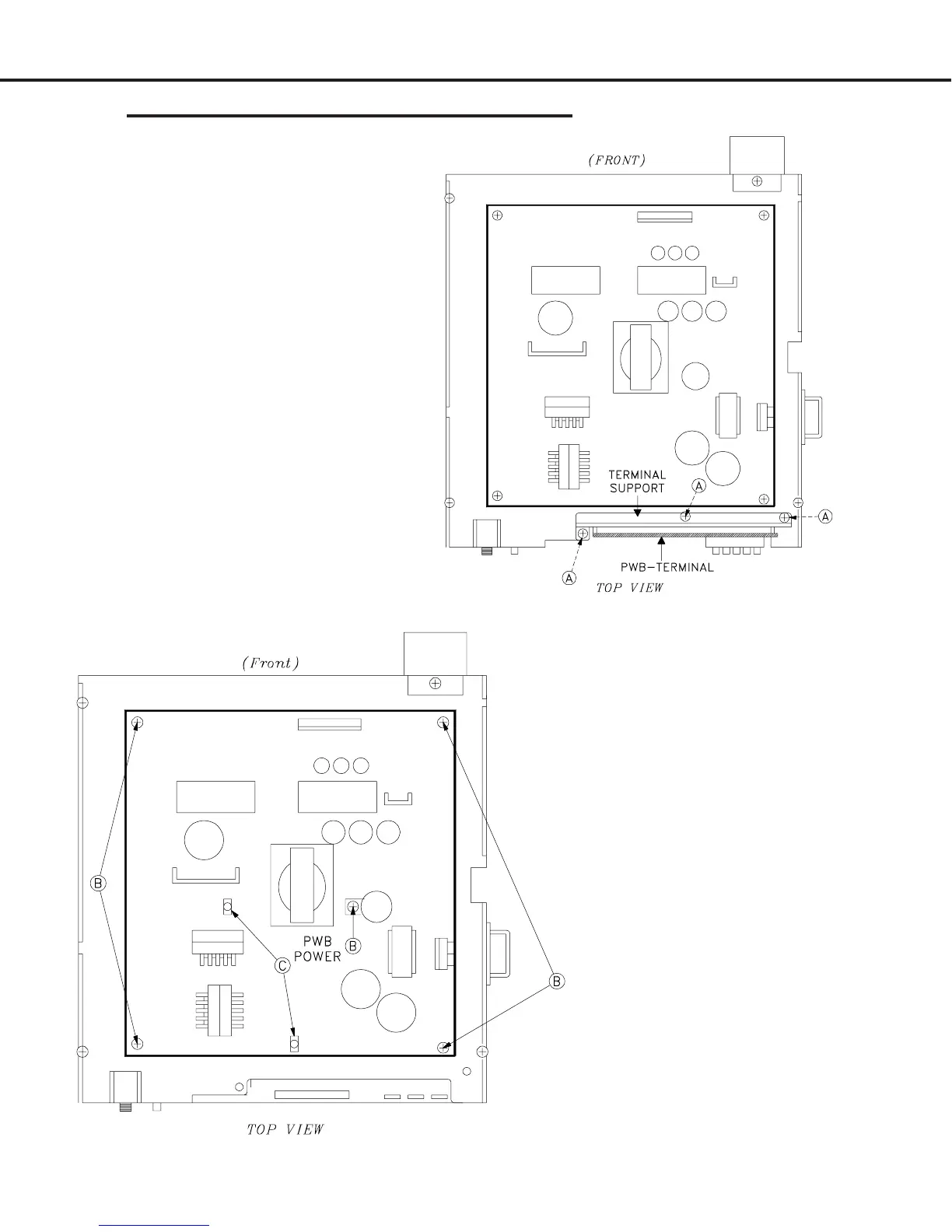
PWB-TERMINAL Removal
1) Remove three screws (A).
2) Carefully lift the PWB-TERMINAL
and its’ support bracket from the
chassis.
PWB-POWER Removal
1) Remove five screws (B)
2) Disconnect all cables to the PWB-
POWER.
3) Release clips (C).
4) Carefully lift the PWB-POWER from the
chassis box.
PWB-TERMINAL Replacement
1) Reverse the removal procedure to
install the new PWB-TERMINAL.
2) Transfer data from PWB-MAIN to
the new PWB-TERMINAL. (Refer
to Data transfer on page 34).
PWB-POWER Installation
1) Reverse the removal procedure to install a
new PWB-POWER.
2) No data transfer is required.


 To Next Page
 Loading...