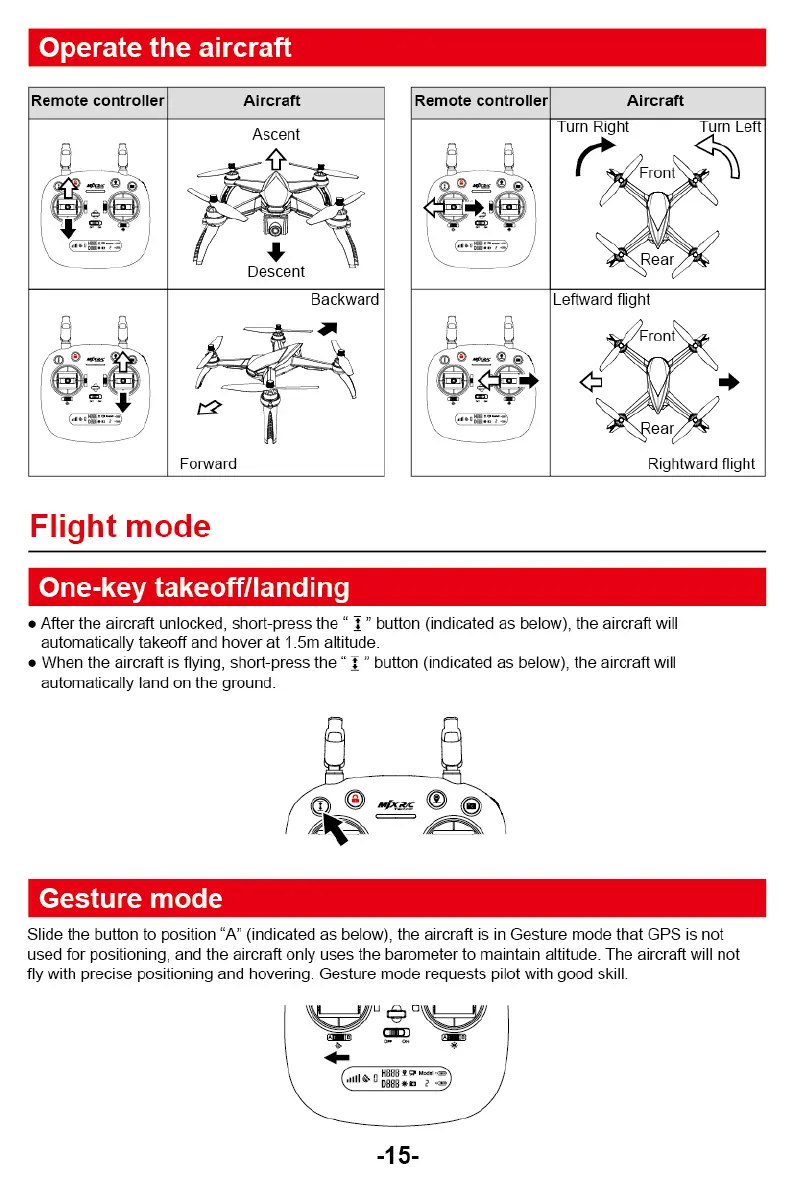
Operate the aircraft
Remote controller
Aircraft
Ascent
---
.
",
- -----
1711
''
Descent
1
4
IPI
■
•
,i
.
---."
.
Backward
-I
ig
,-
-
f
./.
A.--.
4
05-........:
I
' •
-'
•
- -
'-:.
f'
**
,
-
[
Forward
\..„
(..-2=74
'--
-
---
Flight mode
Remote controller
Aircraft
e
a
-
e
.
—
r
Turn Right
Turn Left
,,.
Front, e„
V
,
Rear ,'
i
A
0
.
Leftward flight
,,-/Front\
s
.
/
,
i
s
l
i \
•
"-.
\
•ear
.
■
,`
Rightward flight
One-key takeoff/landing
•
After the aircraft unlocked, short-press the " I " button (indicated as below), the aircraft will
automatically takeoff and hover at 1.5m altitude.
•
When the aircraft is flying, short-press the " " button (indicated as below), the aircraft will
automatically and on the ground.
Gesture mode
Slide the button to position "A" (indicated as below), the aircraft is in Gesture mode that GPS is not
used for positioning, and the aircraft only uses the barometer to maintain altitude. The aircraft will not
fly with precise positioning and hovering. Gesture mode requests pilot with good skill.
°W;
4111
■
(Col
eipg:::
70
-15-



 To Next Page