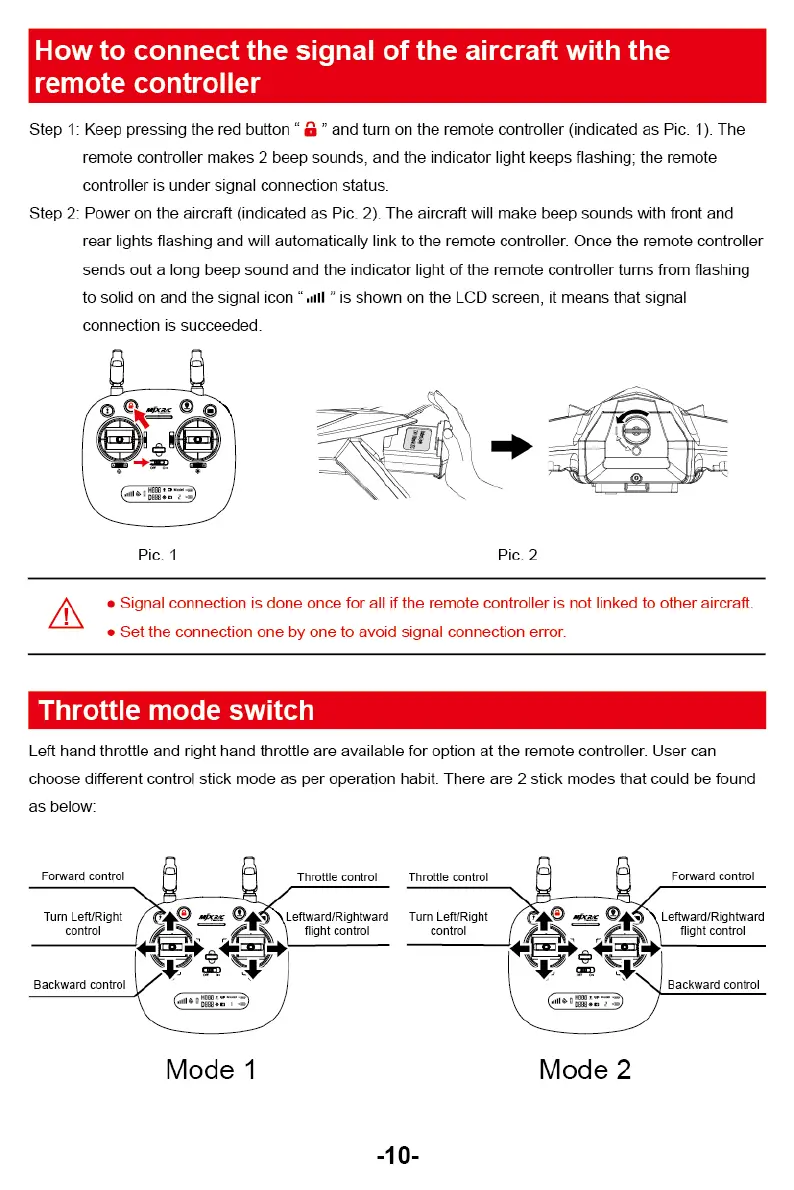
Pic. 2
Pic. 1
L
• Signal connection is done once for all if the remote controller is not linked to other aircraft.
•
Set the connection one by one to avoid signal connection error.
Leftward/Rightward
Turn LefURig ht
flight control
control
Mode 1
Mode 2
dill
4D
HH
"
°
“
-
'
1011... a
t
-10-
Throttle control Throttle control
Forward control
Leftward/Rightward
flight control
Backward control
Forward control
Turn Left/Right
control
Backward control
How to connect the signal of the aircraft with the
remote controller
Step 1: Keep pressing the red button
a"
and turn on the remote controller (indicated as Pic. 1). The
remote controller makes 2 beep sounds. and the indicator light keeps flashing; the remote
controller is under signal core c::: on status.
Step 2: Power on the aircraft (indicated as Pic. 2). The aircraft will make beep sounds with front and
rear lights flashing and will automatically link to the remote controller. Once the remote controller
sends out a long beep sauna and the indicator light of the remote controller turns from flashing
to solid on and the signal icon "an! is shown on the LCD screen, it means that signal
connection is succeeded.
Throttle mode switch
Left hand throttle and right hand throttle are available for option at the remote controller. User can
choose different control stick mode as per operation habit. There are 2 stick modes that could be found
as below:



 To Next Page