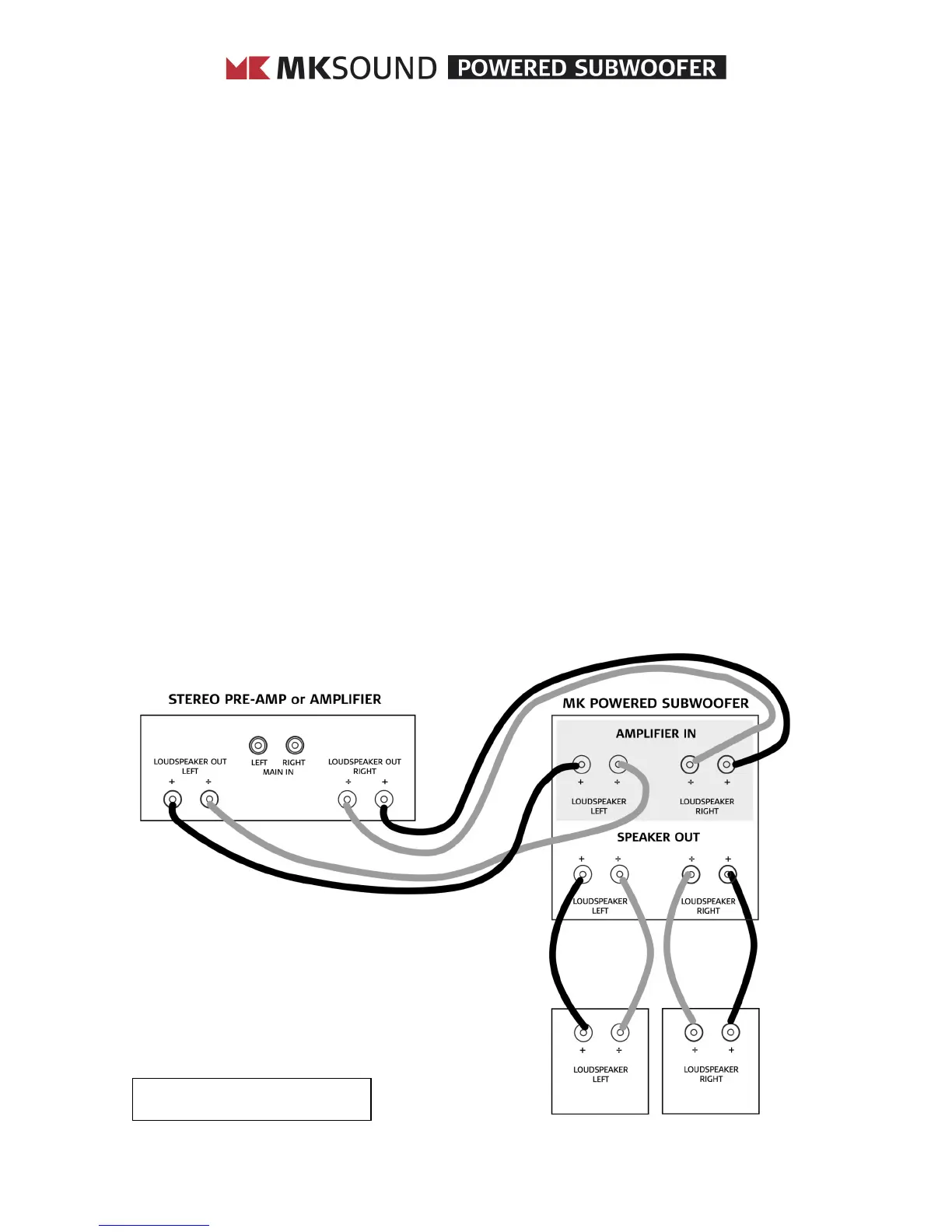
USING SPEAKER WIRE CONNECTIONS
Some MK Sound owners hook up their subwoofers by connecting them to their receiver or
amplifier using speaker wires. To do this, you make the same kind of connections that you would
use to connect your satellite (or main) speakers, except that both the left and right channels first
go to the subwoofer. (If you are using two subwoofers, connect one channel only to each
subwoofer.) To make this connection, use heavy gauge wire – at least 2 mm diameter (12 AWG)
– see figure 3 and do the following:
1. Run speaker wire from your receiver or amplifier’s left speaker output terminals to the
subwoofer’s left channel “FROM AMPLIFIER” terminal.
2. Connect your receiver or amplifier’s left channel positive (+) terminal to the
subwoofer’s left red (+) “FROM AMPLIFIER” terminal.
3. Connect your receiver or amplifier’s left channel negative (-) terminal to the
subwoofer’s left black (-) “FROM AMPLIFIER” terminal.
4. Make identical connections for the right channel.
If you are setting up a two-channel system, your connections are now complete. You need only
place your subwoofer(s) and adjust the settings as described in the following pages.
If you are setting up a surround system, you can still set up your left and right channels in this
manner, but you will also need an additional subwoofer to reproduce the low end from the center,
left surround, right surround and LFE channels. Set your left and right front channels to “Large” in
your surround sound receiver’s set-up menu, and set the other channels to “Small”.
FIGURE 3. CONNECTING A SUBWOOFER USING SPEAKER WIRES



 To Next Page